🎮 More control over Generative app iteration
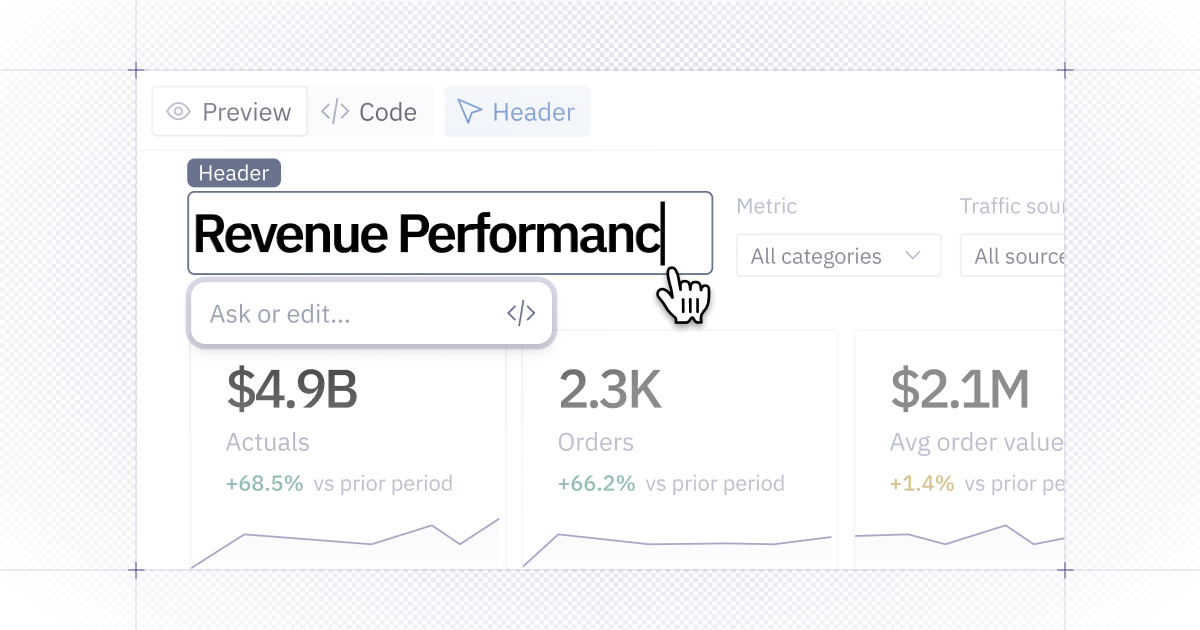
Directly edit text, create new chart properties, and queue up viz tweaks all in line.
✏️ Direct text editing
You can also edit text directly in the app builder, just like you would in a doc. It’s perfect for tweaking titles, or updating copy in your data apps and you can now view the underlying source code with just 1 click.
If your text has a computed variables, you can inline prompt the agent to make updates — this is particularly helpful for things like quick formatting changes.
📊 Targeted Chart Updates
Reorganize charts or adjust a visualization without touching the rest of the app. Select the chart and ask the agent to switch the chart type, update the data, or refine it’s layout — without regenerating everything around it.
💬 Create new chart properties with a prompt
Need a control that’s not already on the Style panel? You can now select a component, describe the property you want, and Hex creates it.
Once added, you can adjust that property directly alongside the charts other controls.
📎 Analyze CSVs directly in Slack
You can now upload a CSV in Slack and ask Hex to analyze it without leaving the conversation. Attach a file, mention @Hex, and ask for a summary, trends, top performers, anomalies, or anything else you want to explore.
Hex returns key takeaways and tables directly in the thread, plus a link to continue working in Hex.
🔑 Clearer OAuth errors in published apps
When a publisher’s OAuth credentials expire, viewers can still access the published app in a read-only state instead of being blocked by an error screen. The publisher receives a clear error message to refresh their token and restore live data.
Expired tokens are also easier to identify in connected app settings, and SQL cells now explain when credentials are the reason a query can’t run.
🔐 Bring your own AI provider
AWS Bedrock and Google Gemini Enterprise Agent Platform are now available as bring-your-own-key providers in Hex.
If your organization already manages AI through AWS or Google Cloud, you can bring that setup to Hex. Claude inference runs through your provider account, so your existing security controls, agreements, and usage logs stay in place.
Already route AI traffic through a compatible third-party gateway? You can keep using that infrastructure with Hex, too.
Admins can get started in Settings → AI & agents → Provider settings → Add an API key.
🔎 More visibility and model choice for BYOK
It’s now easier to track who’s using AI (and choose the right model) when you bring your own key.
Every BYOK request includes the Hex user’s email, so admins can attribute usage, split costs across teams, and investigate activity in their AI gateway.
Organizations using an OpenAI key can also choose Sol, Terra, or Luna. Pick the model that fits the job without switching away from BYOK.