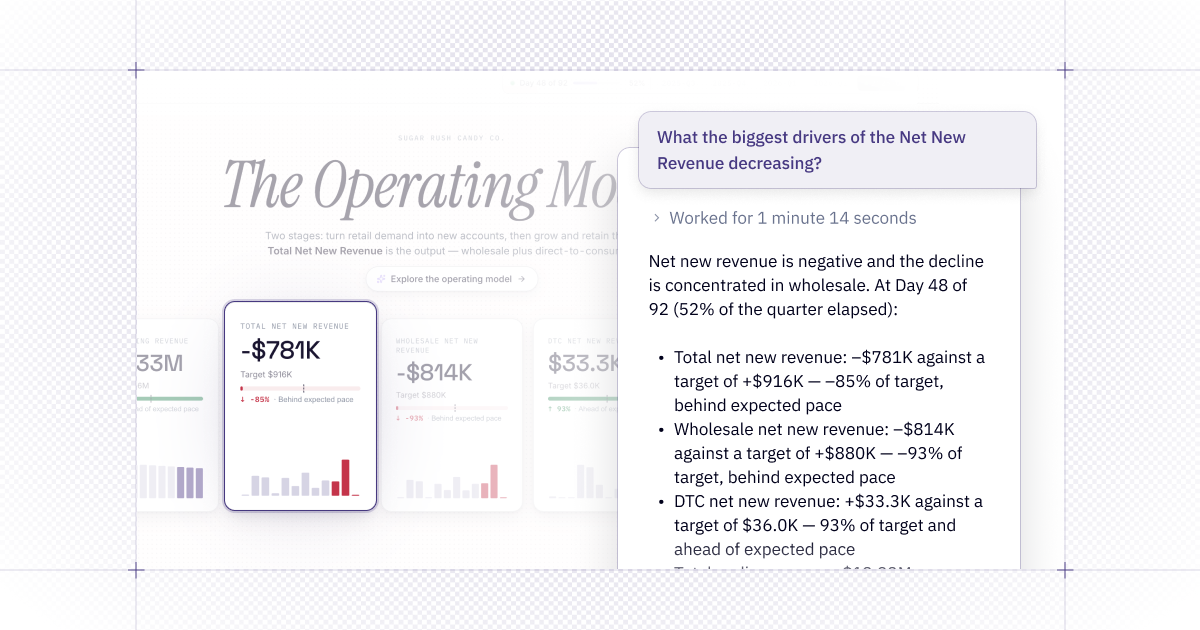
💬 Chat with Generative Apps
Data apps are built to answer questions, but the best insights often lead to new ones. Explorers can now chat with published Generative Apps to ask follow-up questions, investigate metrics, and keep exploring in an agent Thread without leaving the app.
Tip: @-mention a specific cell or name the tab or section you’re viewing, along with any relevant filters or inputs.
Learn more about Chat with App.
📎 Schedule CSV exports for Generative Apps
You can already set scheduled notifications for your Generative Apps, giving your stakeholders updated insights when they need it. Now you can include a CSV export.
Scheduled exports use the project’s underlying cell outputs — not transformations made in the app interface. Before scheduling an export, confirm that its cell outputs contain only data appropriate for the notification’s recipients.
🤖 New models to pick from
Different tasks call for different models. Six new options are now available in Hex:
- Opus 5.5 for hard, open-ended investigations
- Fable 5.1 for complex, nuanced work
- GPT 6 Sol for maximum reasoning depth on tough problems
- GPT 6 Astra for involved analytical work
- GPT 6 Luna for quick, lightweight tasks
- Grok 4.6 for another model to try across everyday workflows
GPT 6 Sol, Astra, and Luna also support an optional Fast mode for quicker responses, at a higher credit cost.
Availability: Fable 5.1 is available on multi-tenant and non-EU, non-HIPAA single-tenant stacks.
To enable Fable 5.1, go to Settings → AI & Agents and turn on Allow data retention for specific models. No action is needed for the other models, they're already available in the model picker in the prompt bar.