Chat with App
- Chat with App is available on the Team and Enterprise plans, which include monthly per-seat credit grants that can be used towards Hex AI features.
- Users require an Explorer role or higher to use Chat with App.
- Users must have Can explore access or higher on a published app in order to chat with it.
- Users must have Can query access on all data connections used in the app.
Chat with App lets you ask natural language questions and run analysis from a conversational sidebar on any published app. Each conversation is backed by the Threads agent with the app as context, so in addition to interacting with the app itself - viewing outputs, updating inputs, applying filters, re-running the app - the agent can write and run SQL and python, pull from semantic models, build charts, and work with uploaded files to extend its analysis beyond what is in the app.
What the agent can do
The agent can interact with the app and run analysis through a single conversational interface:
- View and summarize project outputs: Understand and synthesize the results and insights displayed in the app
- View and summarize project logic: Give explanations of how metrics used in the app are defined
- Update input parameters and project filters: Modify existing input parameters and add or update cell filters to refine and inspect the data in the app
- Sort tables: Apply sorts to table displays and pivot tables
- Query your data warehouse: Write and run SQL against connected data sources
- Work with semantic models: Query metrics and dimensions from your connected semantic layer
- Build charts and analysis: Create new visualizations and computed outputs within the conversation
- Use uploads: Bring in uploaded files for ad hoc analysis
Each Chat with App conversation kicks off a Thread that can be accessed from both the published app and the typical Threads interface. For a full description of agent capabilities, see Threads.
How to use
Getting started with Chat with App is simple:
- Open the chat sidebar: Select the agent icon in the top right of your published app to open the chat interface
- Ask questions: Type natural language questions or requests in the chat
- View responses: The agent will respond with insights, summaries, or an extended analysis based on your request
- Continue in Thread: Each Chat with App conversation starts a Thread with the app as context. You can view (and continue) the conversation in the Threads interface by clicking the down caret next to the chat title
Open full thread
Since each chat with app conversation is its own Thread, you can continue every chat with app conversation in the Threads interface. Just click the down carat next to the chat title and select "Open full thread".
Sharing conversations
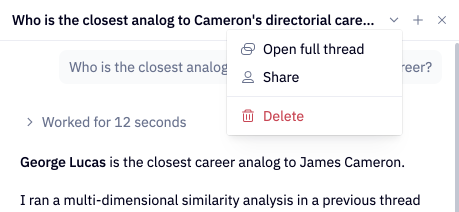
You can share specific Threads that were started from Chat with App with specific users or groups by clicking the down caret next to the chat title. You can grant users Can view thread or Full access to your Thread.
For users to view the shared Thread, they must have Can view results access or higher to any data connections used by the Thread.
Best practices
To get the best results from Chat with App:
- Use clear, specific questions: The more specific your question, the better the agent can help
- Provide context when needed: Reference specific data or outputs to provide the agent direction
- Iterate with follow-up questions: Build on previous responses to refine your analysis
Chat with a Generative app
On a Generative app, the agent doesn't automatically see the app as it's rendered on your screen unless you tell it where to look. That means it won't know which filters or sorts you've applied, which input values you've selected, or which part of the app you're looking at. Be specific about which part of the app you're asking about and any state you've applied to it. You can also @-mention a specific cell to aim the agent straight at it. Prompts such as these give the agent what it needs:
Go to slide 2 and tell me why churn spiked in March
I filtered the pipeline chart to EMEA, which accounts are driving the total?
Open the revenue tab and summarize the trend
I set the date input to last quarter, why is revenue down?