Suggestions
AI-recommended improvements to your workspace context, based on patterns in agent conversations.
- Available on the Team and Enterprise plans.
- Admins can view suggestions and their summaries, accept/reject changes, and review supporting evidence from individual conversations.
- Managers can view suggestions and their summaries, accept/reject changes, but cannot access evidence from individual conversations.
What are Suggestions?
Suggestions are actionable recommendations that Hex generates by analyzing patterns across agent conversations and warnings in your workspace. When agents repeatedly struggle with the same kind of question — a missing definition, an undocumented join pattern, an unendorsed table — Hex surfaces a suggestion with a concrete proposed fix.
Your workspace gets smarter the more it's used. Rather than manually auditing conversations to figure out where agents need help, Suggestions surface the highest-impact context gaps and propose specific changes you can review and apply — turning every agent interaction into an opportunity to improve.
You'll find them in the Suggestions tab within the Context Studio. Suggestions appear incrementally as Hex identifies potential improvements.
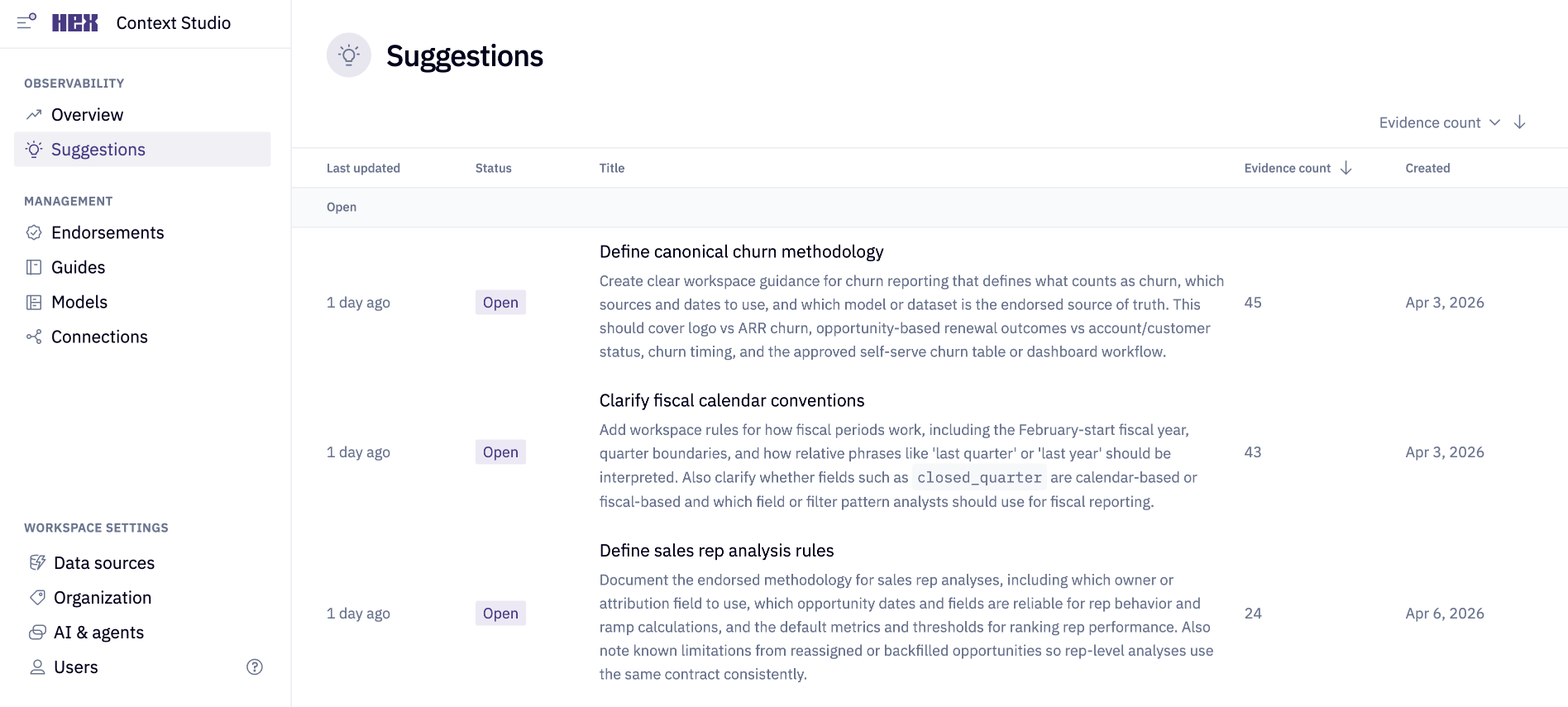
How suggestions are created
When multiple warnings from recent conversations point to the same underlying knowledge gap, Hex groups them into a single suggestion and proposes concrete changes — such as updating a guide, improving a table description, or endorsing a resource — that an Admin can act on.
Not every warning becomes a suggestion. Hex filters for durable, reusable knowledge gaps — things an Admin can fix once to prevent similar issues in future conversations. One-off mistakes and product limitations are filtered out.
Review a suggestion
The Suggestions page lists all suggestions for your workspace, grouped by status. Each row shows a title, status, evidence count, and timestamps. You can sort by evidence count, last updated, or created date to prioritize your review. Evidence count is the number of signals contributing to the suggestion.
Click any suggestion to open its detail view.
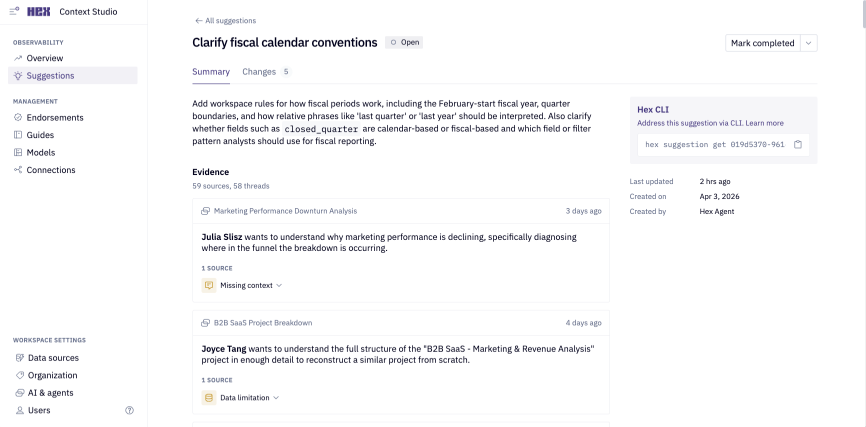
Summary and evidence
The summary provides an AI-generated description of the knowledge gap — what's missing, why it matters, and what should be clarified or documented.
Below the summary is the evidence list, which shows the conversations that contributed to this suggestion. For each piece of evidence, you'll see:
- The conversation title and the user who created it
- The warning type and message explaining what triggered the suggestion
- A link to open the full thread
Only Admins can see individual conversation evidence.
Changes
The Changes tab shows the proposed updates that Hex recommends to address the knowledge gap. Each proposed change includes a target resource, rationale, a diff preview (for file-based changes).
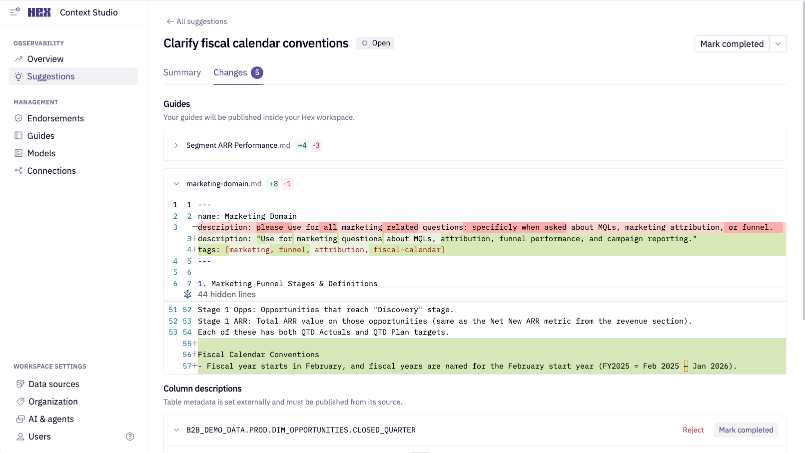
Proposed changes can include:
| Change type | What it does |
|---|---|
| Create a guide | Drafts a new guide to document a missing concept, definition, or workflow |
| Update a guide | Edits an existing guide to add or clarify information |
| Update workspace rules | Modifies workspace rules with new instructions for agents that are relevant to the entire workspace |
| Update table or column descriptions | Proposes improvements to metadata descriptions so agents better understand your data |
| Endorse a resource | Recommends endorsing a table, schema, or semantic model so agents prioritize it |
You can accept or reject each proposed change individually.
For changes to workspace rules or guides managed in Hex, click publish to apply the change. For guides synced from an external system like GitHub, you'll need to make the change in that system yourself, then mark the proposed change as completed in Hex. The same applies to metadata changes.
Review proposed changes carefully — they're AI-generated recommendations, not automatic fixes, and may need small adjustments before applying.
Resolve a suggestion
After reviewing the suggestion and making any necessary changes, you can close the suggestion:
- Mark as completed: The suggestion has been addressed. Use this after accepting changes or manually fixing the issue outside of Hex.
- Mark as dismissed: The suggestion isn't actionable or relevant. You can optionally provide a reason to keep a record of why it was dismissed.
Manage suggestions with the CLI
You can also manage suggestions programmatically using the Hex CLI. This is useful for building custom workflows — for example, feeding suggestions into another tracking system or reviewing them alongside other admin tasks.
| Command | What it does |
|---|---|
hex suggestion list | Lists all suggestions in your workspace, with options to filter by status and sort by evidence count or date. Shows only open suggestions by default |
hex suggestion get <suggestion_id> | Returns the details and evidence for a specific suggestion |
hex suggestion update <suggestion_id> --status <COMPLETED or DISMISSED> | Updates the status. Optionally pass --dismiss-reason "<reason>" when dismissing. |
You can find a suggestion's ID by opening it in Context Studio — the ID appears in the sidebar on the right and in the URL.
Configure suggestions
Admins can fine tune how the review agent generates suggestions from the "Configure Suggestions" button. Use this to control how sensitive suggestions are to recurring agent interactions, and to give the review agent stylistic and structural guidance for the changes it proposes.
Thresholds
Thresholds set the minimum signal required before the review agent will generate a new suggestion. Higher values require more repeated activity across users and conversations before a suggestion is surfaced while lower values allow suggestions to be generated from narrower signals.
| Setting | Default | Description |
|---|---|---|
| Minimum users | 2 | The minimum number of distinct users that must encounter a knowledge gap before a suggestion is generated. |
| Minimum conversations | 2 | The minimum number of separate agent conversations that must reflect the gap. |
| Minimum sources | 3 | The minimum number of underlying signals supporting the suggestion. (There may be multiple sources from one conversation). |
Custom instructions
Use the custom instructions field to tailor the suggestions that the review agent proposes. This guidance is applied to every suggestion the review agent generates.
Examples of potential instructions:
- Asset preferences — which asset types to favor when proposing changes (e.g., "prefer updating guides over adding column descriptions", "create/update semantic model metadata rather than guides when the gap is metric-related").
- Stylistic conventions — tone, formatting, and naming standards (e.g., "use camelCase for semantic metric names", "write column descriptions as complete sentences ending in a period").
Click Save to apply your changes.