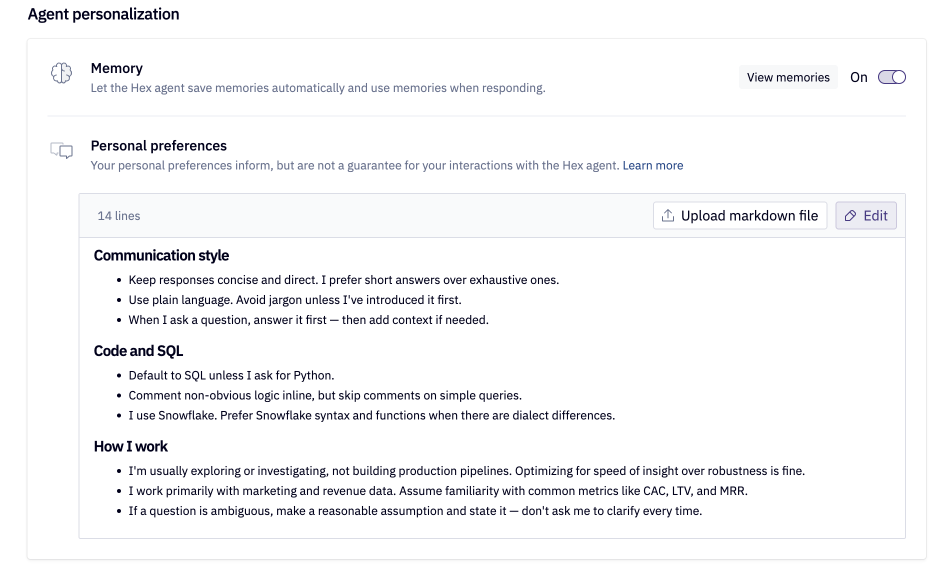
Agent personalization
Personalize how the Hex agent responds with a profile built from how you work.
- Users need an Explorer role or higher to access agent personalization.
User memory
User memory is a personal profile Hex maintains for you so the agent is aware of your domain, typical questions you may ask, and the tables or semantic models you use most often. It is scoped to your user account per workspace and is not shared with teammates. Your user memory profile can be viewed at any time by navigating to Settings > Agent personalization > View memories. You can turn off user memory via the same panel.

Turning off user memory stops Hex from building or using your memory profile in agent interactions.
Your user memory profile is updated nightly is inferred from your Hex usage and conversation signals. Every conversation with the agent receives this profile as user context, shaping how it investigates and responds without replacing checks against schemas, endorsements, guides, and other workspace context. It also supports continuity across conversations — drawing on recent threads to support natural follow-up without any action required from you.
Personal preferences
Personal preferences let you store instructions that shape how Hex agents work with you — things like how you want results visualized, how much explanation you prefer, or conventions to follow when writing SQL or Python. These apply across all of your agent interactions and are personal to your account; they are not visible to other users in your workspace.
You can view and edit your personal preferences by navigating to Settings > Agent personalization > Personal preferences.