Credits
AI features in Hex use a credit system.
Overview
Hex accelerates data workflows to help teams move faster with trusted insights. Hex's AI features use a credit system.
To ensure everyone can use AI, Hex awards monthly credit grants to Editor and Explorer seats. Admins can optionally purchase pooled add-on credits for additional usage.
- Customers with annual contracts who wish to purchase add-on credits can contact sales@hex.tech to update their contract.
Credit Consumption
Core AI features in Hex consume credits based on the effort required to complete your request. Many factors influence effort-based credit consumption, including the complexity of the task, the amount of data or other context the agent needs to process, and the inference and other resources required to complete the task.
You can view how many credits a given agent task consumed after the task is complete, by clicking the three-dots menu:
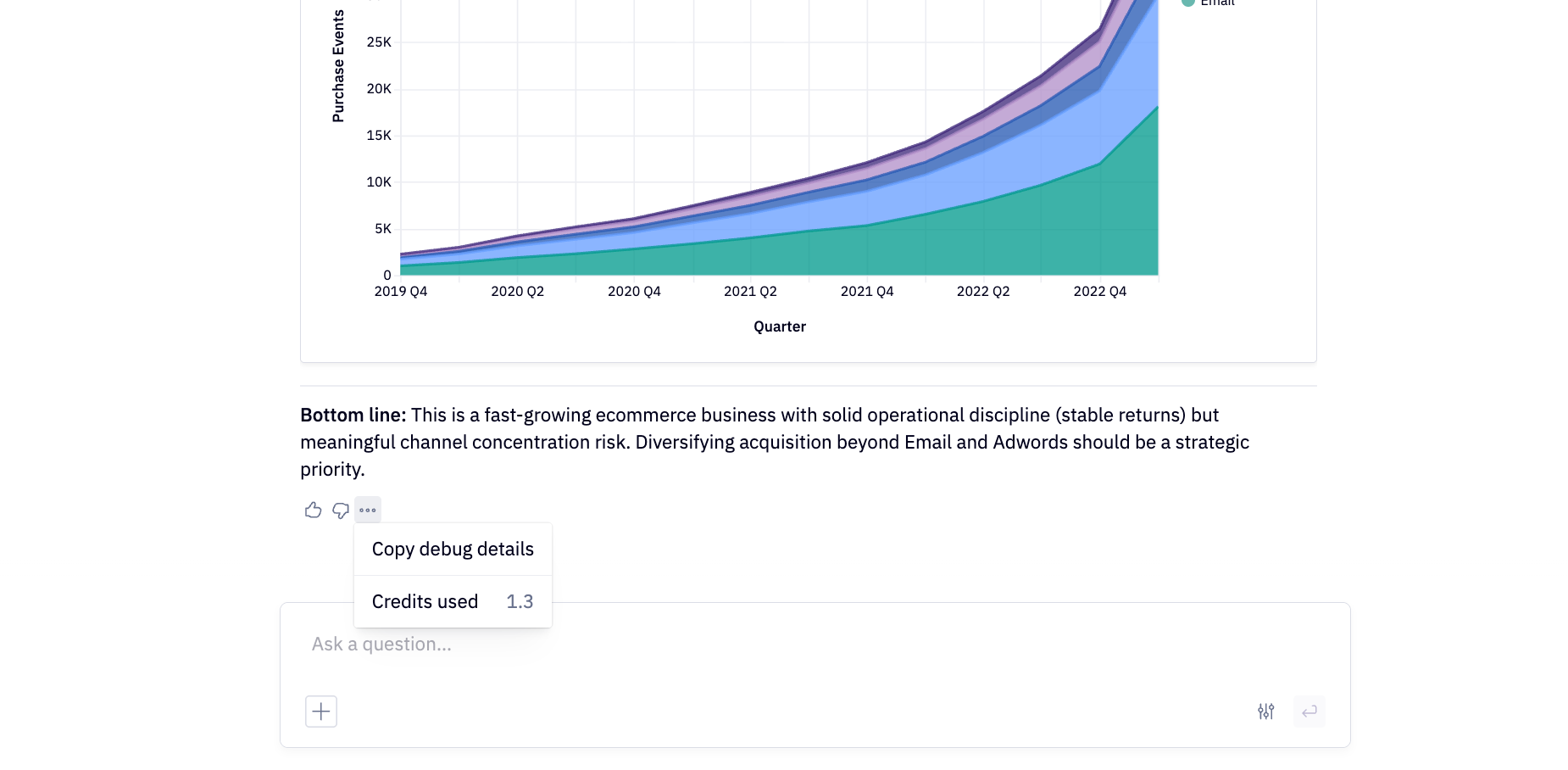
Below are some illustrative examples:
| Example Task | Example Credit Consumption* |
|---|---|
| How many customers do we have? | ~1 credit |
| Build me a subscription retention line chart broken out by pricing plan | ~2 credits |
| What user actions correlate most strongly with 30-day retention? | ~3 credits |
| Build me a 12-month ARR forecast. | ~5 credits |
| Build a data app that visualizes sales by product category, and lets users generate sales forecasts by customizing timeframe and subcategory inputs. | ~10 credits |
| Trigger a Context Studio suggestion refresh via CLI or API | ~0.5 credits |
* Actual credit consumption will vary based on your particular data, context, and prompt history.
Not all AI features consume credits. For example, title generation is included in paid plans and Context Studio topic generation is included in Team+ plans. Other AI features may be exempt from credit consumption temporarily during their Preview or Beta period. The list of features that consume credits is subject to change as we evolve our product offering, and currently includes all Hex agents, including agent runs triggered from external integrations such as Slack, MCP, or CLI.
Monthly credit grants
- Monthly per-seat credit grants apply to standard seat-based subscriptions, and do not necessarily apply to custom Enterprise contract structures.
To ensure everyone can try and use Hex’s AI features, users on paid seats are awarded a monthly credit grant. Monthly per-seat credit grants are assigned to the individual user, reset each billing cycle, and can’t be transferred, shared, or rolled over.
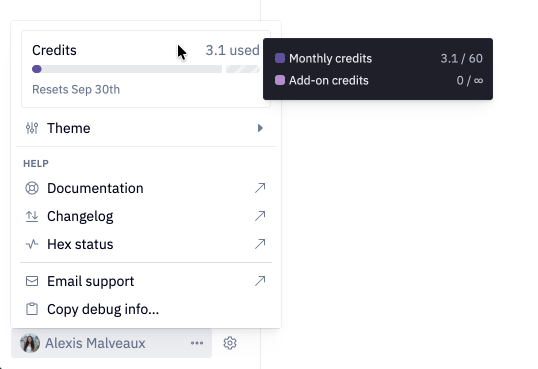
You can view the current balance of your monthly credit grant in the user credit meter, located in the user menu at the bottom of your Hex workspace's left sidebar.
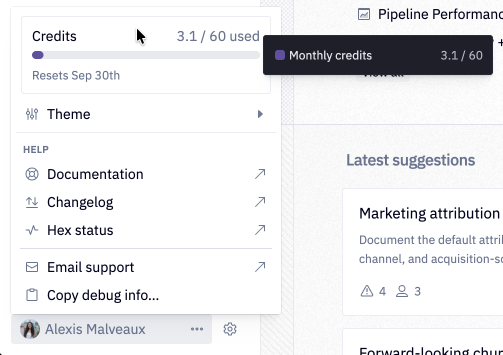
Credit grants vary by plan and seat type:
| Plan | Seat Type | Credit Grant |
|---|---|---|
| Community | Editor | 5 credits/month |
| Professional | Editor | 30 credits/month |
| Team | Editor | 40 credits/month |
| Team | Explorer | 10 credits/month |
| Enterprise | Explorer & Editor | Specified on order form |
Once you’ve used your monthly credit grant, you can draw additional credits from the workspace credit pool, if available.
Admins can manage credits and view usage in Settings > Credits.
Add-on credits
Admins can opt to purchase pooled add-on credits for additional usage. There are a few ways to purchase or earn add-on credits:
- Admins can enable auto top-ups to automatically refill their workspace credit pool when needed.
- Customers with annual contracts can purchase committed add-on credits upfront at contract start or renewal.
- Hex may occasionally award bonus add-on credits.
Add-on credits go to the shared workspace credit pool, which Admins can view in Settings > Credits.
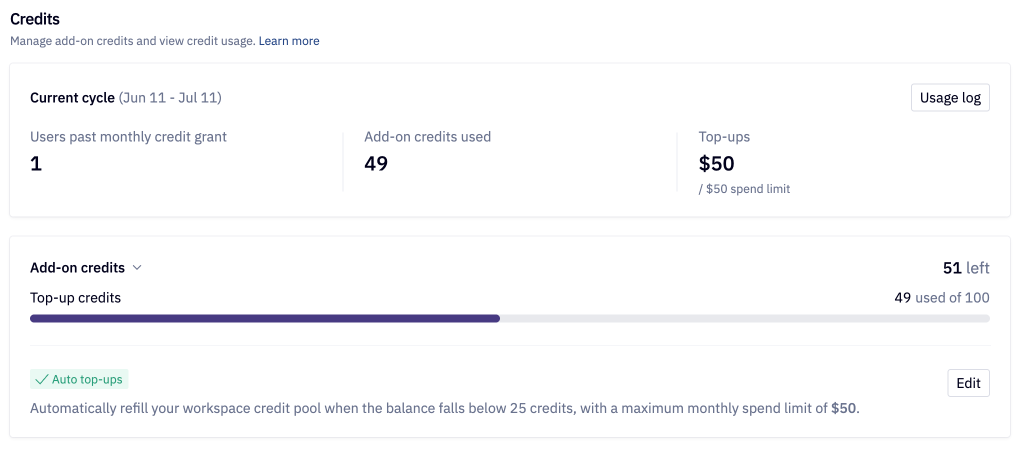
Workspace credit pool
The shared workspace credit pool is your balance of add-on credits. By default, any user who depletes their monthly per-seat credit grant can draw from the shared workspace credit pool.
Auto top-ups
You can think of auto top-ups as "pay-as-you-go" credits. When auto top-ups are enabled, your workspace credit pool will automatically refill when needed.
Mechanics
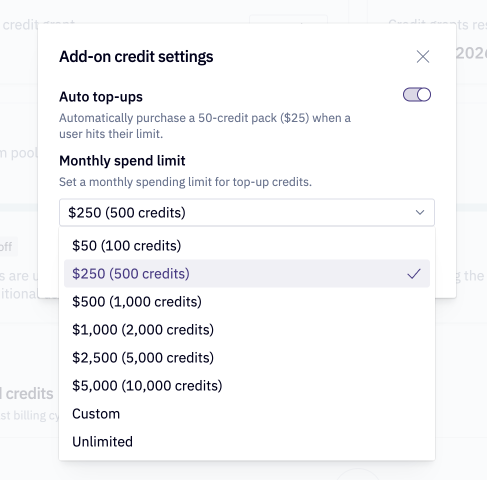
- Enabling auto top-ups will automatically purchase a 50-credit pack ($25) for the workspace pool when the balance falls below 25 credits.
- Customers paying by credit card will be charged immediately for auto top-ups.
- Customers with alternate payment methods will be charged at the end of their true-up period.
- Credits purchased via auto top-up rollover to the next monthly billing cycle.
Spend limits
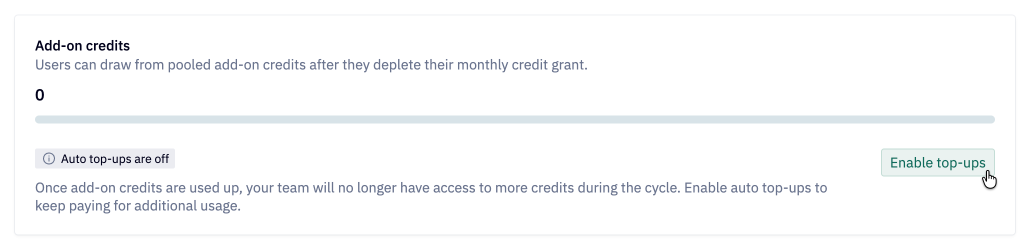
Admins can set a monthly limit on auto top-up purchases to help stay within budget.
- From Settings > Credits, click Enable auto top-ups (or Edit if auto top-ups are already enabled).
- Set a custom spend limit, or choose from a preset option.
- Click "Save".
Auto top-up spend limits are anchored to your monthly billing cycle and will go into effect immediately once saved.
Credit usage controls
Admins can control how many add-on credits each user is allowed by applying a credit limit to a User, Group, or Workspace.
- Available on Team and Enterprise plans.
- Credit limits will always respect your workspace credit pool settings. Regardless of their limit, users will be limited to the auto top-up spend limit or to the workspace credit pool balance if auto top-ups are disabled.
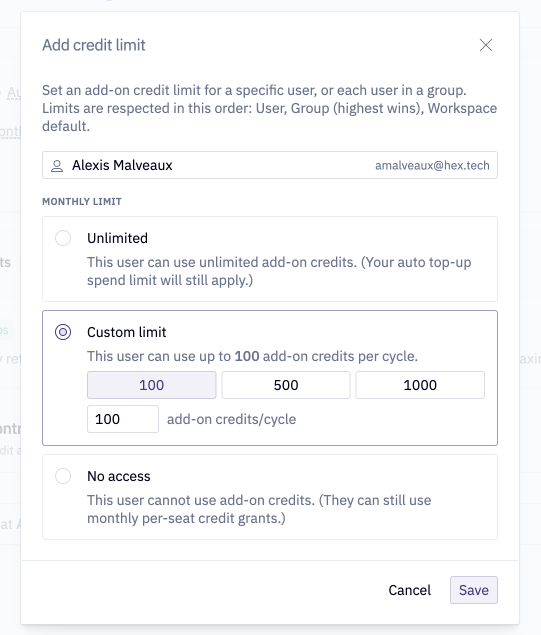
- Credit limits are respected in order of User > Group (highest wins) > Workspace Default
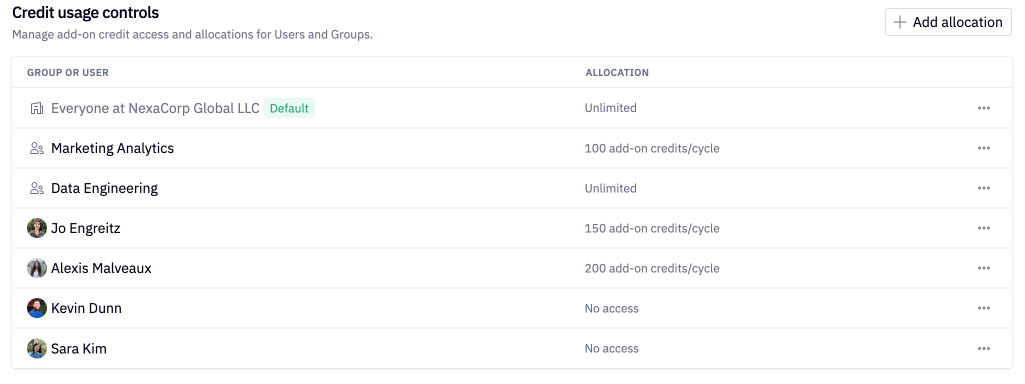
Manage credit limits from Settings > Credits > Credit usage controls. The Workspace Default limit is always active, and all active limits can be adjusted via the three dot (...) menu to the right.
To create a new User or Group credit limit, click + Add limit and choose from Unlimited, Custom amount, or No access.
Credit usage visibility
All Hex users can view their own credit balance, and Admins and Managers have additional workspace-wide visibility.
Personal credit usage visibility
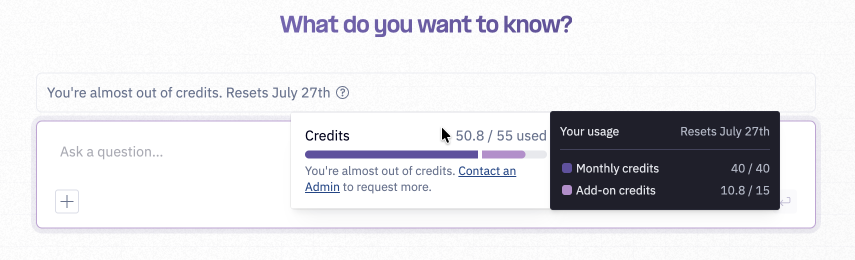
User meter: Users can view their current cycle credit balance by clicking into the user menu in the bottom left.
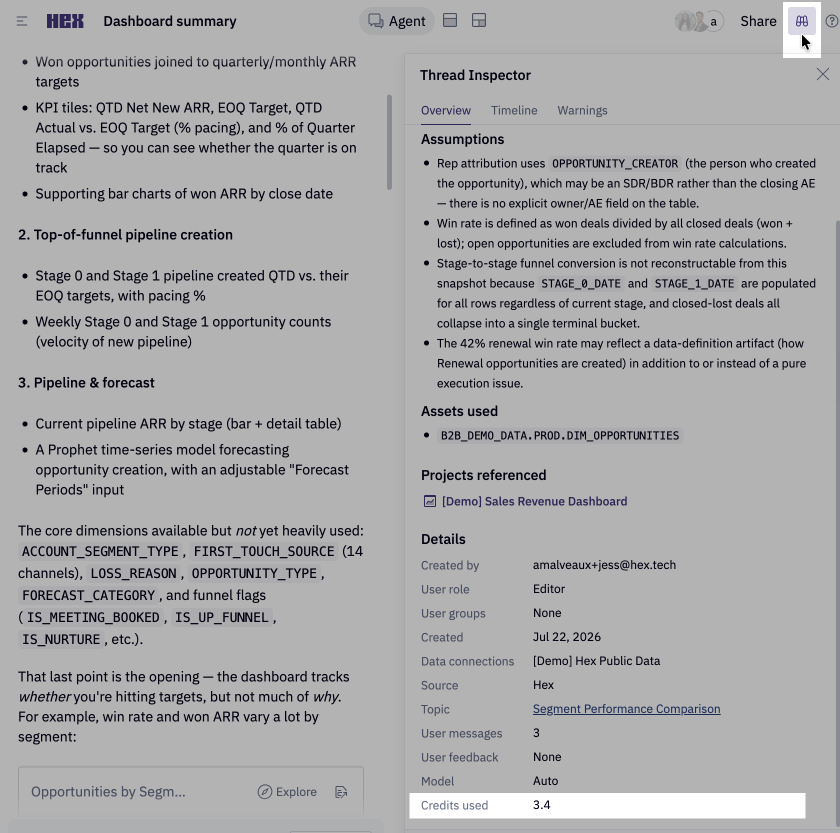
Thread inspector: Users can view credit consumption at the the Thread level via the Thread inspector in the top right. Available for standalone Threads and Threads created from a Published App
Agent message credit receipts: Users can view message-level credit receipts from the three-dots menu below the agent's response.
Usage warnings: Users are warned when they've used 80% of their credits, when they are out of credits, and when the workspace pool is out of add-on credits.
Admin credit usage visibility
Admins can view workspace-wide credit usage from Settings > Credits
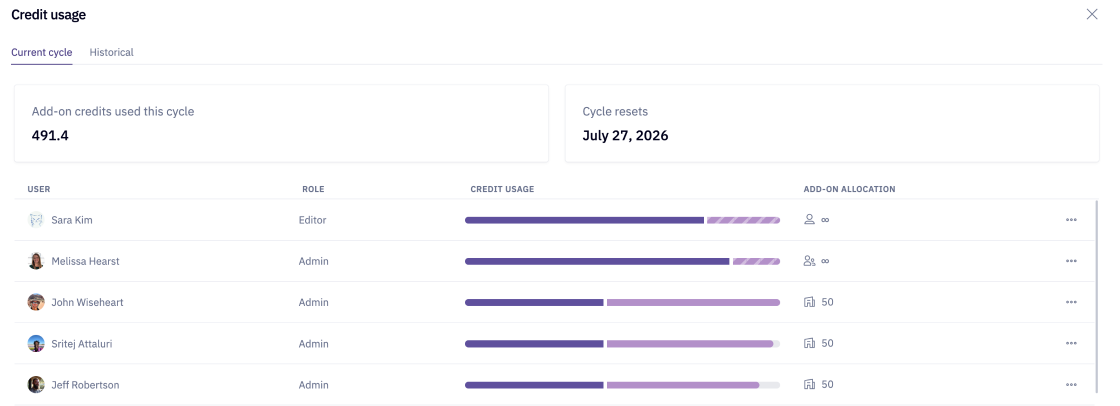
- Usage log - Current cycle: review credit consumption by user, total add-on credit usage, and allocation amounts for the current billing cycle
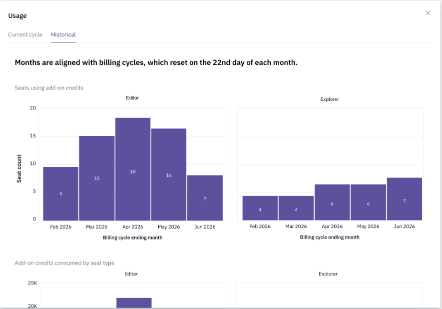
- Usage log - Historical cycle: review add-on credit consumption by user and seat type for historical billing cycles
- Workspace credit pool: view shared add-on credit balance, usage, and top-up spend amount for the current billing cycle
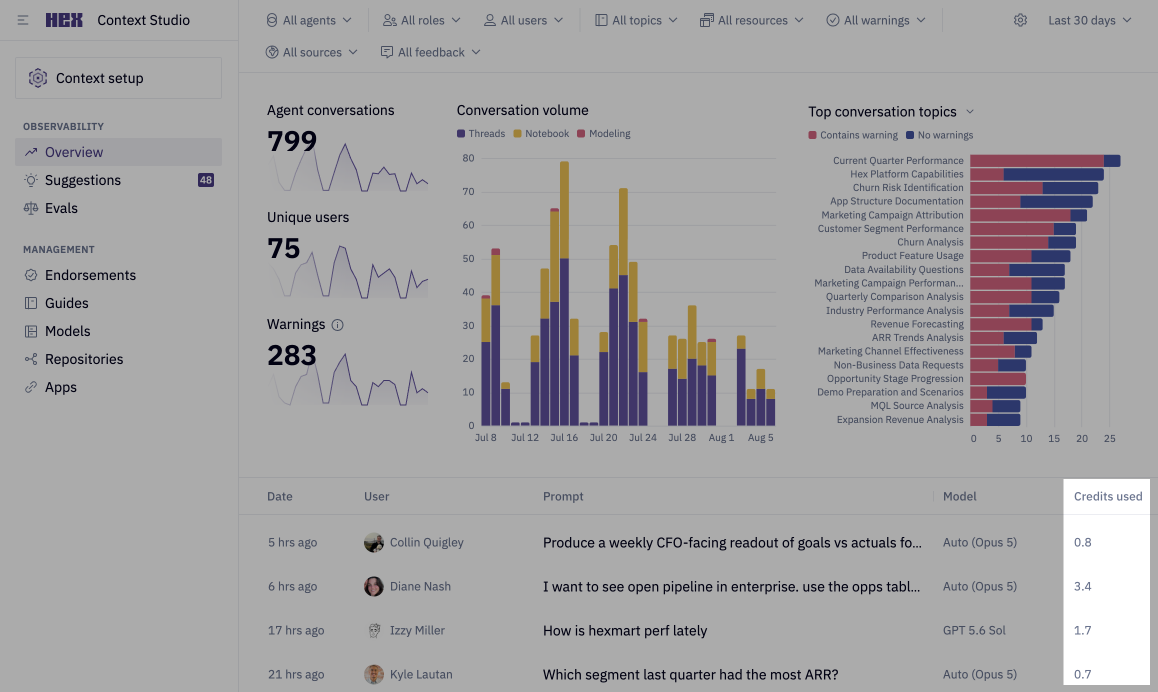
Context Studio: Admins and Managers can view total credit consumption for individual Threads
FAQs
What happens when I run out of credits?
Once the workspace credit pool is empty or users consume their monthly grant and add-on credits, users will be blocked from submitting additional agent prompts. If an agent run is in progress when a user runs out of credits, the agent run will execute to completion — after this run completes, all subsequent agent chats will be blocked. Any spillover credits consumed in the final agent run will be billed for workspaces with add-on credits enabled, and exempted for workspaces with add-on credits disabled.
Do credits roll over?
- Monthly per-seat credit grants do not rollover.
- Add-on credits purchased via auto top-up rollover to the next monthly billing cycle.
- Committed add-on credits purchased for annual contracts expire at the end of the contract cycle.
How can I manage credit efficiency?
Hex provides several tools and resources to help teams optimize their credit usage:
- Credit efficiency tactics — Learn about agent optimization strategies from our team
- Context Studio — Refine workspace context
- Model & Effort Picker — Adjust model and effort selection
- AI best practices — Explore recommended patterns for using AI in Hex
How does BYOK work with credits?
On the Hex Enterprise plan, Admins can bring your own key (BYOK) to route all LLM usage in Hex through your model provider API key. Users still receive their monthly per-seat credit grants, but those grants aren't drawn down by agent usage. Since AI usage in Hex will not consume credits with BYOK enabled, AI usage visibility will need to be accessed through your external model provider.