Sensitive data connections for external integrations
Workspace Admins can mark data connections as sensitive so the Hex Agent treats them carefully in Threads started outside of the Hex app.
- Users require an Admin role to access this setting.
- Sensitive data connection settings apply to the Hex Agent in Slack, the Hex MCP Server, the public API, and the CLI.
When a user starts a Thread from an external integration — such as the Hex Agent in Slack or the Hex MCP Server — the Hex Agent automatically selects from connections the user has access to. That means a casual question in Slack or an MCP chat could route analysis against data you'd rather keep off those surfaces.
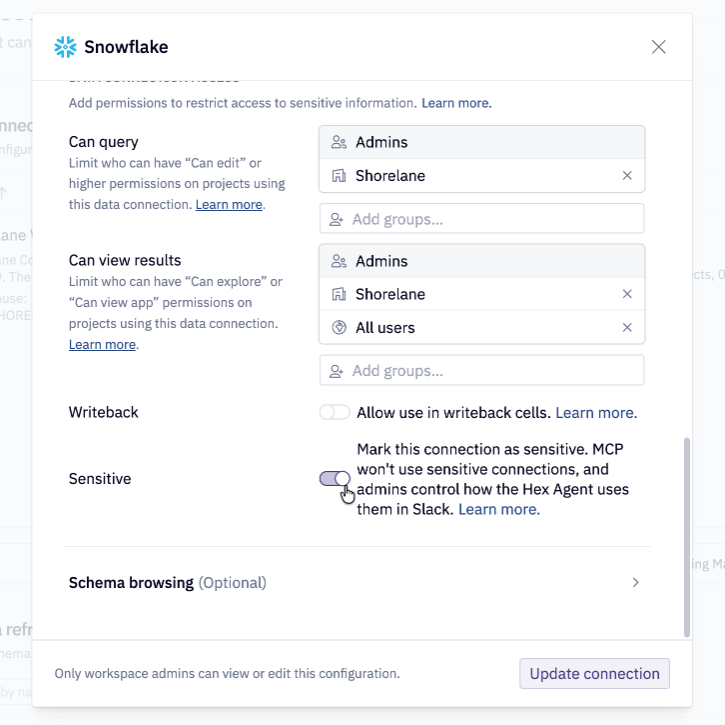
Marking a connection as Sensitive tells Hex to treat it differently in those workflows:
- The Hex MCP Server, public API, and CLI follow a workspace setting that controls whether they can query sensitive connections and read cell outputs from projects that use them. This setting is off by default.
- The Hex Agent in Slack follows a separate workspace setting that controls whether the agent can use sensitive connections, and how replies appear when it does.
Connections marked Standard remain available to the Hex Agent in Slack, MCP, API, and CLI, subject to the user's ordinary connection access.
Some OAuth connections are locked as Sensitive because query results cannot be shared with other users. Admins cannot change that marking.
For best practices on descriptions, exclusions, and connection permissions, see Optimizing your data connections for the Hex Agent.
Configuration
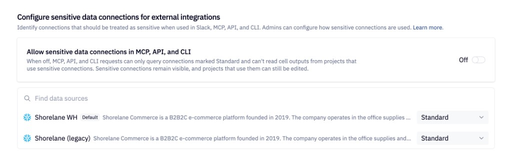
Mark connections as Standard or Sensitive in either:
- Settings → Integrations → Configure sensitive data connections for external integrations
- Settings → Data sources → select a data connection → Access
Sensitive connections in MCP, API, and CLI
Admins can turn on Allow sensitive data connections in MCP, API, and CLI under Settings → Integrations → Configure sensitive data connections for external integrations.
This setting is off by default.
When off:
- MCP, API, and CLI requests can only query connections marked Standard.
- Cell outputs cannot be read from projects that use a sensitive connection, including
get_cell_outputand chart images through the MCP server. - Sensitive connections remain visible, and projects that use them can still be edited.
When on:
- Threads started through MCP, API, or CLI can query sensitive connections the user has access to.
- Cell outputs from projects that use those connections can be read through MCP, API, and CLI.
If a Thread is started or continued through MCP, API, or CLI, this setting applies to the whole Thread — including later messages sent from the Hex app.
Slack uses a separate setting and is not affected.
Slack
To choose how the Hex Agent handles sensitive connections in Slack, see Hex Agent data connection permissions.
Related documentation
- Hex Agent in Slack: using the agent in Slack, permissions, and sensitive-connection reply behavior.
- Hex MCP Server: connecting Claude, Cursor, and other MCP clients to Hex.
- CLI: managing projects, cells, and Threads from the command line.