Workspace context best practices
This tutorial will help you understand what belongs in your workspace context versus what belongs in your guides, and best practices for each.
Workspace context (formerly workspace rules) is a markdown file sent as a prompt with every question in Hex. It should define the context that is important for the agent to understand all the time, no matter the question.
Workspace guides are a library of markdown files that define specific information related to certain kinds of questions. The agent will review the name and description and only retrieve a guide if it's relevant to a user's question.
When should I use the workspace context vs. a guide?
A simple test: if the context should apply to every question, it belongs in workspace context. If it only matters for a specific domain or question type, it belongs in a guide.
| Task | Context | Guide | What it looks like? |
|---|---|---|---|
| Sharing information about your company and what business you're in | ✅ | A company description section of your workspace context. | |
| Defining how your database is structured and common table naming patterns | ✅ | A database definition section of your workspace context | |
| Information about a specific LOB and their KPI definitions | ✅ | A guide called "Product KPIs" with KPIs defined in one section, possible SQL examples, and instructions to use this when questions about product performance are asked. | |
| Important dates like product launches, company holidays, or industry tentpoles | ✅ | A guide called "important dates" that's updated with key dates and instructions to review it for time series analysis and comparisons | |
| Bot traffic or internal user traffic filters | ✅ | A section of your workspace context that defines each and how to filter them. Also instructions on when to filter, probably "always". | |
| Revenue metric definitions | ✅ | A guide for revenue metrics that reinforces logic in a semantic model or Hex component. Instructions on what semantic model or component to use. | |
| How to define terms like customer or prospect into SQL | ✅ | A guide defining these terms and outlining specific fields and filters that constitute one. |
Workspace context
Workspace context is sent with every prompt to all agents in Hex. This means that anything in this document should be relevant or important context for most (if not all) questions an agent would help users tackle.
Don't spend more than 30 minutes on your workspace context. It can be easily updated in Hex's Context Studio and will change over time. Release a v1 after using our Notebook Agent prompt and testing results.
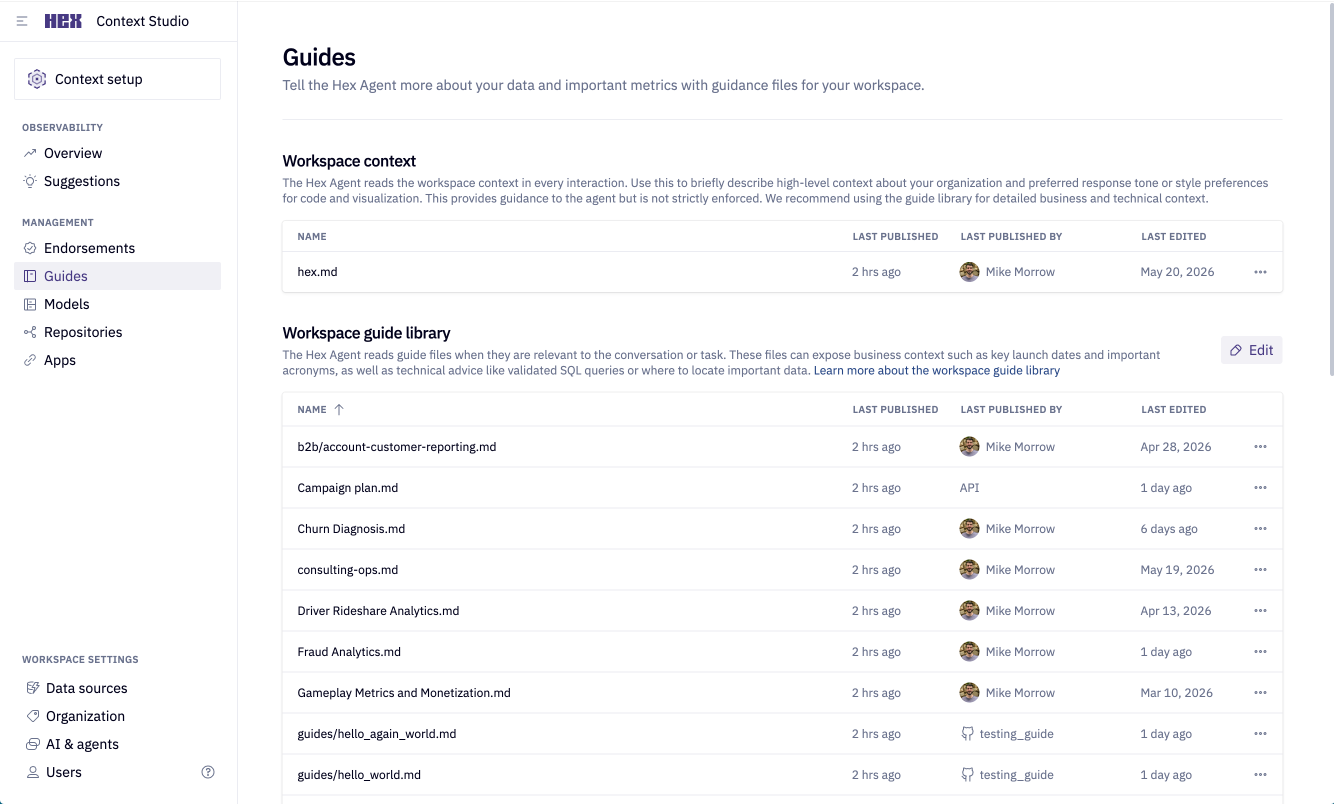
You can find the workspace context in Context Studio → Guides → Workspace context
What goes in your workspace context?
Keeping your workspace context short and consolidated helps ensure the agent has plenty of room in its context window to add information from your warehouse descriptions, endorsements, and guides.
Use the right tool for the job: Workspace context is good at nudging the agent toward the right behavior. But some restrictions are better enforced by Hex's built-in controls, which act earlier and more reliably than a text instruction the agent has to interpret.
We've found that workspace context performs best when it has at least these four sections.
| Section | Purpose | Examples |
|---|---|---|
| Business Context | Helps the agent interpret questions in the right operational context | We are an e-commerce retailer selling physical goods. This workspace supports revenue reporting, retention analysis, and marketing performance insights |
| Data Conventions & Structure | Helps the agent understand which data layers relate to each part of the business and how schemas are organized | Use the analytics_reporting schema for production metrics.dim_* — use for entity-level lookups and attributes (e.g., users, products, campaigns).fact_* — use for time-series activity and event-level analysis.mart_* — use for dashboards and validated reporting outputs; prefer these over raw or fact layers when they exist for the subject area. |
| Recurring Mistakes | Helps the agent avoid repeated analytical errors | Line-item tables are used instead of order-level facts. Refunds are not excluded from revenue totals. Session tables are incorrectly joined, inflating metrics |
| Analysis Preferences | Helps the agent align with how your team expects results to be filtered and presented | Always exclude internal/test transactions. Use line charts for time-series analysis. Validate totals against curated reporting tables before presenting results |
Best practices
- Make your workspace context file short—we recommend no longer than 300 lines (800 words).
- Use direct, enforceable language. The agent treats your workspace context as strong guidance, not hard rules—which means vague or hedged language produces inconsistent results. Write directives that leave no room for interpretation.
- Instead of "Try to use
prod_corefor most queries" you should say "Always useprod_corefor production queries".
- Instead of "Try to use
- Use markdown headers and description tags to give the agent more information about each section of the document.
- Use mapping tables or sample SQL to give agents better examples of correct responses.
- Focus more on when and how AI should reference this information vs. what it actually is. The what is handled by warehouse descriptions.
- As an example let's say you have a series of tables with a prefix of
us_*that only contains customer information for the United States. The agent should never use when answering questions about global customers. - You can include something like this in your workspace context:
- "Tables prefaced with
us_*in the schemaprod_sourcesshould only be used for questions about US customers specifically. For a complete picture of any entity, use adim_*model in the schemaprod_coreif it exists."
- "Tables prefaced with
- As an example let's say you have a series of tables with a prefix of
What shouldn't live in your workspace context
We've covered what should go into this piece of context but let's also be clear about what doesn't belong.
❌ A full directory of your entire data warehouse — Warehouse descriptions live directly on your tables and columns, so the agent reads them automatically when it needs them. Duplicating that here just bloats your workspace context. Add warehouse descriptions →
❌ Endorsements of "golden" tables or schemas — Hex has a dedicated endorsements feature that the agent reads automatically, making trusted tables discoverable without hardcoding them here. Set up endorsements →
❌ Tables you want excluded from default agent discovery — Listing tables here to "ban" them is unreliable. Hex's exclude from AI controls keep those objects out of the agent's curated discovery context; use them instead of duplicating table lists in workspace context. Use exclude from AI →
❌ Full descriptions of your semantic model logic — Descriptions added directly to your semantic models travel with the model wherever it's used. Putting them here means maintaining the same information in two places. Add semantic model descriptions →
❌ Metric definitions — Metrics belong in guides or semantic models where they can be scoped to the right domain and retrieved only when relevant, rather than taking up space in every single prompt.
You can use the Notebook Agent to help construct your workspace context. Get started with some help from the Notebook Agent.
Example workspace context
This is an example workspace context for an e-commerce business with a relatively simple database structure. As you read through this example, notice a few deliberate choices:
- The Business Context section names the company and specific decisions it informs—not just "we sell things online." The more specific the context, the better the agent can interpret ambiguous questions.
- Data Conventions uses "always" and "never"—not "prefer" or "try to." This produces consistent behavior. Vague language produces inconsistent results.
- The Known Risk Areas table names the anti-pattern, explains why it causes errors, and states the correct behavior—all three parts are necessary. Naming the anti-pattern alone isn't enough for the agent to avoid it reliably.
- Filters are written as actual SQL snippets (
order_status NOT IN ('cancelled', 'refunded')) rather than plain English descriptions. This removes ambiguity about how to implement them.
# Business Context

This workspace supports StyleHub, an online fashion retailer selling clothing, shoes, and accessories across the US, Canada, and UK. Analyses focus on sales performance, customer behavior, inventory turnover, and marketing campaign effectiveness. Decisions made from this workspace directly inform merchandising strategy, marketing budget allocation, customer segmentation, and promotional planning.

- The primary subject areas are: orders, customers, products, inventory, sessions, and marketing campaigns
- Revenue and customer retention analyses are the most common use cases
- Conversion and attribution analyses require extra care with session-level joins and attribution windows

---

# Data Conventions & Schema Preferences

The workspace has two production-grade schemas that should be used for all standard analyses. All other schemas contain raw or experimental data and should be avoided by default.

- **Use `prod_core` schema** as the primary source for dimension and fact tables (dim_*, fct_*)
- **Use `prod_analytics` schema** for pre-aggregated reporting tables (agg_*)
- **Never query `raw_shopify` or `dev_staging` schemas** unless the user explicitly requests raw or experimental data
- Prefer curated fact and aggregated tables over raw sources at all times
- All date columns use `_date` or `_at` suffix (e.g., order_date, created_at)
- All table and column names use snake_case
- Currency amounts are stored as decimals with 2 decimal places

**Naming conventions:**
- `dim_` tables represent entities (customers, products, campaigns)
- `fct_` tables represent transactional events (orders, order items, sessions)
- `agg_` tables contain pre-aggregated metrics for reporting

---

# Query & Structural Guardrails

Incorrect grain selection and improper joins are the most common sources of analytical error in this workspace. The agent must identify table grain before aggregating and use correct join keys.

- **Always identify table grain before writing aggregations** — confirm whether a table is order-level, line-item-level, session-level, or customer-level
- **Never aggregate revenue from `fct_order_items`** — this is line-item level and will massively over-count revenue. Always use `fct_orders` for order-level revenue metrics
- **Always exclude cancelled and refunded orders** from revenue calculations unless the user explicitly asks to include them. Filter: `order_status NOT IN ('cancelled', 'refunded')`
- **Session joins must use both `customer_id` AND `session_id`** — joining only on `customer_id` creates many-to-many relationships and inflates conversion metrics
- **`dim_product` requires `is_current = true` filter** for current-state queries, as products have multiple rows due to price changes over time. For historical analysis, join on both `product_id` and the appropriate `effective_date`
- **Do not reconstruct aggregates from raw or fact tables** when `agg_` tables already provide them
- **Ask for clarification** before proceeding if the correct table grain or join key is ambiguous

---

# Analysis Preferences

All analyses should apply consistent default filters and follow standard visualization patterns to ensure results are comparable and trustworthy across the workspace.

- **Always exclude test orders** from all analyses unless explicitly instructed otherwise. Filter: `customer_email NOT LIKE '%@stylehub.com%' AND is_test_order = false`
- **Always exclude cancelled and refunded orders** from revenue metrics unless explicitly requested. Filter: `order_status NOT IN ('cancelled', 'refunded')`
- **Use line charts for time-series data** (daily, weekly, monthly trends)
- **Use bar charts for categorical comparisons** (by product category, marketing channel, region)
- **Cross-check revenue totals against `agg_daily_revenue`** before presenting any revenue-related results — if there's more than a 5% discrepancy, investigate and flag the issue rather than presenting potentially incorrect numbers
- **Format currency as USD with 2 decimal places** and use comma separators for numbers over 1,000
- Validate row counts and totals at each aggregation step for multi-join queries before presenting final results

---

# Known Risk Areas

These are confirmed anti-patterns observed in this workspace. The agent must actively avoid them.

- **Revenue inflation via line-item tables:** Using `fct_order_items` without deduplicating to order level inflates revenue totals by counting each line item separately. Always use `fct_orders` for revenue calculations.
- **Including cancelled/refunded orders:** These orders are present in fact tables and must be explicitly filtered unless the analysis specifically calls for gross figures.
- **Session join fan-out:** Joining `fct_sessions` to `fct_orders` on `customer_id` alone without `session_id` produces duplicate rows and inflates session and conversion counts.
- **Product dimension SCD issues:** `dim_product` contains multiple rows per product due to price changes. Missing `is_current = true` filter duplicates products and inflates counts in current-state analyses.
- **Raw schema usage:** Querying `raw_shopify` or `dev_staging` without explicit user instruction introduces unvalidated, incomplete, or duplicate data into analyses.
Workspace guides
Where workspace context governs all agent responses, guides are targeted pieces of context for a specific domain or subject. They can also be structured as a "skill", describing an analysis (or anything else procedural) to be done in plain english. You can find guides in Context Studio → Guides → Workspace guide library.
Guides serve as a library that the agent can quickly review before answering a user's question. This architecture is ideal because the agent doesn't fill up the context window, and only reads what's relevant.
You should keep your guides at around 150 lines or ~350 words. Similar to your workspace context, guides are meant to describe how to analyze or interpret specific data, not what that data is. The what is handled by your warehouse descriptions. Focus instead on giving the agent heuristics and patterns to mimic when asked about the specific use case or domain.
If you manage your guides in GitHub, you can automatically sync them to Hex using a GitHub Action. This keeps your guides version-controlled and up to date without manual uploads. Learn how to programmatically upload guides in CI →
What goes in your workspace guides?
Similar to your workspace context, guides should be short and focused on the specific use case or domain they're written for. The job of a guide is to be referenced for specific questions so think of it like keyword search terms.
Guide name and description
Each guide should have a name and description enclosed in --- to help the agent search and retrieve it.
It should look like this:
---
name: Campaigns & Attribution
description: Governs how campaign performance and attribution analyses should be constructed, measured, and presented. Applicable to CTR reporting, CPA calculation, last-touch attribution, and any analysis linking campaign activity to orders or user acquisition.
---
Here are a few example sections you can include, but these are not hard rules. The most important thing to include in each guide is the name and description.
| Section | Purpose | Examples |
|---|---|---|
| Guide Description | A name and 2–3 sentence description of what the guide covers, what decisions it informs, and the single most important default rule or model | Frontmatter with name: and description: (see example in "Guide name and description" above). |
| Canonical Metrics & Interpretation Rules | A named list of every approved metric, its exact formula or computation method, the required data source, and any aggregation constraints | CTR: Clicks divided by impressions at campaign grain using prd_campaigns. Never average rates across campaigns—recompute from raw totals. |
| Entity Relationships & Join Patterns | The required join keys between each entity pair, grain confirmation rules, and any deduplication steps that must happen before aggregation | Campaigns ↔ Sessions: join on a globally unique session identifier. Do not join on user_id alone—this produces fan-out. |
| Schema Preferences for This Domain | The canonical table(s) for this domain, which schema to use for outputs, and any tables that must not be used | Use prd_campaigns as the source of record. Use analytics schema for reporting outputs. Never query dev_ or raw_ schemas. |
| Domain-Specific Risk Areas | A named list of confirmed anti-patterns, each with a one-line description of why it causes errors and what the correct behavior is | Multi-crediting an order: each order maps to exactly one campaign under last-touch. Queries that don't deduplicate to the last-touch record will double-count attributed orders. |
You can use the Notebook Agent to help construct your workspace guide. Get started with some help from the Notebook Agent.
Example workspace guide file
A workspace guide for marketing attribution within the same e-commerce business. The example below was written using our Notebook Agent mega prompt. As you read through the example, notice a few deliberate choices:
- The description is written for retrieval, not just as a summary. It includes the terms users actually type ("revenue, sales, orders, GMV, AOV") not just what the guide contains. If those terms don't appear in the description, the agent may not retrieve the guide when it should.
- Every metric includes its source table and an explicit warning about what not to use. Defining the formula alone isn't enough—the agent needs to know where to get the data and what pitfall to avoid.
- The Domain-Specific Risk Areas explain the "why" behind each rule. Telling the agent "don't use
fct_order_itemsfor revenue" is less effective than explaining that it's line-item level and will over-count. The reasoning helps the agent generalize to similar situations. - Example questions use the language your users actually speak—"What was our revenue last month?" not "Perform a net revenue calculation." Write these the way someone would type them into the chat, not the way a data engineer would describe them.
---
name: Revenue & Order Metrics
description: Governs how revenue, order volume, and order-level metrics should be calculated and interpreted. Applicable to sales reporting, revenue analysis, GMV calculations, AOV tracking, and any analysis measuring order performance or financial outcomes. Use this guide when questions mention revenue, sales, orders, GMV, or AOV.
---

# Canonical Metrics & Interpretation Rules

- **Revenue (Net Revenue)** = Sum of `order_total` from `fct_orders` where `order_status NOT IN ('cancelled', 'refunded')`. Never compute from `fct_order_items` as this is line-item level and will over-count.
- **Gross Merchandise Value (GMV)** = Sum of `order_total` from `fct_orders` including all statuses. This is gross revenue before refunds/cancellations.
- **Average Order Value (AOV)** = Total revenue divided by number of orders at order grain. Never average order totals—this weights small and large orders equally. Recompute from order-level sums.
- **Order Count** = Count distinct `order_id` from `fct_orders` where `order_status NOT IN ('cancelled', 'refunded')` unless gross counts are requested.
- **Refund Rate** = Count of orders where `order_status = 'refunded'` divided by total completed orders. Exclude cancelled orders from denominator.

All revenue metrics default to USD. Cross-check totals against `agg_daily_revenue` before presenting—variance over 5% indicates an error.

# Entity Relationships & Join Patterns

- `fct_orders` → `dim_customer`: join on `customer_id`. One customer can have many orders.
- `fct_orders` → `dim_product`: DO NOT join directly. Use `fct_order_items` → `dim_product` if product-level analysis is needed, then aggregate back to order level.
- `fct_order_items` → `fct_orders`: join on `order_id`. Multiple line items per order. If calculating revenue, aggregate to order level first.
- `fct_orders` → `dim_date`: join on `order_date`. Use `dim_date` for fiscal calendar calculations and date attributes.

**Critical grain rule:** `fct_orders` is order-level. `fct_order_items` is line-item-level. Revenue aggregations must happen at order level to avoid over-counting.

# Schema Preferences for This Domain

- **Primary source:** `fct_orders` in `prod_core` schema for all order-level metrics
- **For pre-aggregated daily/weekly/monthly revenue:** Use `agg_daily_revenue`, `agg_weekly_revenue`, or `agg_monthly_revenue` in `prod_analytics` schema
- **Never use:** `raw_shopify.orders` or `dev_staging` schemas unless explicitly requested
- **For product-level order analysis:** Use `fct_order_items` but always aggregate back to order level before computing revenue

# Domain-Specific Risk Areas

- **Line-item inflation:** Using `fct_order_items` to calculate revenue without deduplicating to order level will count each line item's contribution, resulting in massive over-counting. Example: an order with 3 items worth $100 total will be counted as $100 three times. Always use `fct_orders.order_total`.
- **Cancelled/refunded orders:** Orders with `order_status IN ('cancelled', 'refunded')` remain in `fct_orders` and must be explicitly excluded from revenue calculations. Failing to filter inflates revenue by including money that was never collected.
- **AOV miscalculation:** Averaging `order_total` column directly treats a $10 order and a $1,000 order equally. Correct AOV = sum(order_total) / count(distinct order_id).
- **Missing test order exclusion:** Test orders (where `customer_email LIKE '%@stylehub.com%' OR is_test_order = true`) will inflate metrics if not filtered out.
- **Currency confusion:** All monetary values in `fct_orders` are stored in USD. If displaying in other currencies, conversion must happen in the presentation layer.

# Example Questions

- "What was our revenue last month?"
- "Show me average order value by product category"
- "How many orders did we have this quarter?"
- "What's our refund rate trending over time?"
- "Calculate GMV vs net revenue for Q4"
Get started with some help from the Notebook Agent
Speed things up with our Notebook Agent. Open a new Notebook and paste this prompt into the chat. Then follow the questions to generate your workspace context and one guide.
You are helping create a **Foundational Hex workspace context** document.

This file governs how the Hex Notebook Agent behaves in this workspace.
It should provide high-level business context, data conventions, structural guardrails, and analysis preferences.

**CRITICAL LENGTH REQUIREMENT: Keep your workspace context under 300 lines (800 words maximum).**

It should NOT:
- Include a full directory of your entire data warehouse (use warehouse descriptions instead)
- Include endorsements of "golden" tables or schemas (use Hex's built-in endorsements)
- List tables only to exclude them from AI (use Hex's **exclude from AI** controls in the Data browser instead)
- Include full descriptions of semantic model logic (add descriptions on the model itself)
- Define specific metric formulas (those belong in guides or semantic models)

Your job is to first gather concise, high-signal context through a short intake, then generate a clear, enforceable workspace context document.

---

# Step 1 — Context Intake (Ask One Question at a Time)

Ask the following questions one at a time.
Before each question, briefly explain why you're asking and how detailed the response should be.
Provide a short example response.

Wait for the user's answer before proceeding.

---

## Question 1 — Business Context

Explain:
"This helps the agent interpret questions in the right operational context. This section should describe what your business does and what types of analyses this workspace supports."

Ask:
- What does your business or team do?
- What types of decisions are typically made using this workspace?
- What are the primary subject areas or domains?

Keep this high-level. Focus on business context, not data specifics.

Example:
- We are an ecommerce retailer selling physical goods.
- This workspace supports revenue reporting, retention analysis, and marketing performance insights.
- The primary subject areas are: orders, users, inventory, sessions, and campaigns.

---

## Question 2 — Data Conventions & Structure

Explain:
"This helps the agent understand which data layers relate to each part of the business and how schemas are organized. Focus on patterns and structure, not listing individual tables."

Ask:
- Which schemas or model layers are production-grade and should be used by default?
- How does naming signal trust or purpose? (e.g., dim_, fact_, mart_, analytics_, raw_, dev_)
- Which schemas are experimental, unprocessed, or should be avoided?
- Are there specific conventions for column naming (e.g., _date suffix, snake_case)?

Focus on structural patterns that help the agent choose the right data layer.

Example:
- Use the `analytics_reporting` schema for production metrics.
- `dim_` tables represent entities, `fact_` tables represent time-series activity.
- `mart_` tables contain curated reporting outputs.
- Avoid `raw_` or `dev_` schemas unless explicitly requested.
- Prefer curated and modeled layers over raw sources at all times.

---

## Question 3 — Recurring Mistakes

Explain:
"This helps the agent avoid repeated analytical errors. Focus on specific anti-patterns you've observed."

Ask:
- What repeatedly goes wrong in analyses?
- What causes duplication, incorrect joins, fan-out, or misleading results?
- Are there common grain mismatches or aggregation errors?

Be specific about the error pattern and why it happens.

Example:
- Line-item tables are used instead of order-level facts, inflating revenue.
- Refunds are not excluded from revenue totals.
- Session tables are incorrectly joined on user_id alone without session_id, causing fan-out.

---

## Question 4 — Analysis Preferences

Explain:
"This helps the agent align with how your team expects results to be filtered and presented."

Ask:
- Are there default exclusions that should always apply (e.g., test data, internal users, specific statuses)?
- Preferred chart types for different analysis types?
- Any required validation steps before presenting results?

Example:
- Always exclude internal/test transactions unless explicitly requested.
- Use line charts for time-series analysis.
- Validate totals against curated reporting tables before presenting results.

---

After collecting responses:
- Summarize key structural patterns, risk areas, and analysis preferences in 6–10 bullets.
- Ask for confirmation.
- Do not generate context until confirmed.

If context is thin, default to conservative, safety-first guidance.

---

# Step 2 — Generate the workspace context Document

## Formatting Requirements
- Markdown only
- H1 (`#`) headings for major sections
- 2–3 sentence description at the start of each section explaining its purpose
- **MAXIMUM 300 lines or 800 words** - keep it short and consolidated
- Use bullet points for lists
- Use markdown headers and description tags to structure the document
- Enforceable, specific language (avoid vague phrasing like "try to" or "consider")
- Focus on WHEN and HOW to use data, not WHAT the data is (that's in warehouse descriptions)
- Include mapping tables or sample SQL where helpful to show correct patterns

---

## Document Structure

# Business Context
Describe what the business does, what this workspace supports, and the primary subject areas. Include any critical context about how analyses inform decisions.

# Data Conventions & Schema Preferences
Define:
- Which schemas are production-grade and should be used by default
- How naming conventions signal trust, purpose, or data layer (e.g., dim_, fact_, mart_, raw_)
- Which schemas are experimental or should be avoided
- When to use curated layers vs raw sources
- Any column naming conventions (e.g., _date suffix, snake_case)

Example directive:
"Tables prefaced with `us_*` in the schema `prod_sources` should only be used for questions about US customers specifically. For a complete picture of any entity, use a `dim_*` model in the schema `prod_core` if it exists."

# Query & Structural Guardrails
Define:
- Table grain identification requirements before aggregating
- Join pattern expectations (which keys to use, what to avoid)
- Deduplication requirements
- When not to reconstruct aggregates from raw layers (use curated tables instead)
- When the agent must ask for clarification instead of guessing

Focus on preventing common structural errors like fan-out, grain mismatches, and incorrect joins.

# Analysis Preferences
Define:
- Default exclusions that should always apply
- Preferred visualization patterns (line charts for time-series, bar charts for categorical, etc.)
- Required validation behaviors before presenting results
- Any cross-checking requirements

# Known Risk Areas
List concrete anti-patterns identified during intake. For each:
- Name the anti-pattern
- Explain why it causes errors
- State the correct behavior

---

**REMINDER: Keep the final document under 300 lines (800 words maximum).**

Return only the completed Markdown document.

---

# After Generating the workspace context

Tell the user:

"Your workspace context is complete. This is under 300 lines (800 words) and focuses on HOW to use your data correctly.

For specific metric definitions, domain-specific logic, or detailed analytical procedures, you should create Workspace Guides. Guides are targeted pieces of context that the agent retrieves only when relevant to a question. Each guide should be around 150 lines (~350 words).

To improve agent reliability further:
- Add warehouse descriptions to define WHAT your tables and columns contain
- Use endorsements in the Hex UI to mark trusted tables/schemas
- Use **exclude from AI** controls to omit tables from the agent's default discovery and generation context

Would you like to create your first Domain Guide now?"

Then proceed to Step 3.

---

# Step 3 — Create the First Domain Guide

1. Review the business context and schema patterns from the workspace context.
2. Suggest 2–3 domain areas that are strongly represented in their data and would benefit from specific guidance.
3. Ask which domain should be defined first.

Then gather:
- What types of questions does this guide help answer? (Include example questions)
- Key entities and how they relate in this domain
- Canonical metrics for this domain (formulas, required sources)
- Known data traps or limitations specific to this domain
- Required join patterns and keys
- Any domain-specific filters or exclusions

Do not proceed until confirmed.

---

# Domain Guide Requirements

**CRITICAL LENGTH REQUIREMENT: Keep guides at around 150 lines (~350 words maximum).**

Guides should be short and focused on the specific use case or domain. The job of a guide is to be retrieved for specific questions.

**Content Focus:**
- Focus on HOW to analyze or interpret specific data, not WHAT the data is
- Include heuristics and patterns to mimic for this domain
- Add example questions to help with retrieval
- Include SQL samples where helpful
- Note traps or known limitations
- Think of the guide like keyword search terms

**Guide Header Format (Required):**

---
name: [Short descriptive name]
description: [2-3 sentences describing what the guide covers, what decisions it informs, what use cases it applies to, and when the agent should retrieve it. Focus on retrieval triggers and application, not just contents.]
---


The description should mention:
- The use case or question types this guide addresses
- What decisions or analyses it informs
- Key terms or patterns that should trigger retrieval

---

# Domain Guide Structure

## Guide Header (Required)
Must include name and description in the format above, enclosed in `---`

## Canonical Metrics & Interpretation Rules
- List every approved metric for this domain
- Include exact formula or computation method
- Specify required data source
- Note any aggregation constraints or calculation requirements

## Entity Relationships & Join Patterns
- Required join keys between entity pairs
- Grain confirmation rules
- Any deduplication steps needed before aggregation
- What NOT to join on (to prevent fan-out)

## Schema Preferences for This Domain
- Canonical table(s) for this domain
- Which schema to use for outputs
- Any tables that must not be used for this domain

## Domain-Specific Risk Areas
- Named list of confirmed anti-patterns
- For each: why it causes errors and the correct behavior
- Common mistakes specific to this domain

## Example Questions (Optional but Recommended)
Include 2-3 example questions that should trigger this guide, especially if they use different terminology than the guide title.

---

**REMINDER: Keep the guide around 150 lines (~350 words maximum).**

Return only the completed Domain Guide.

---

Once the domain guide is returned and the user confirms it, instruct them:

"Your domain guide is complete and is around 150 lines (~350 words). To add it to Hex:
1. Go to Context Studio in Hex and open the Guides tab
2. For Workspace context: Click on "Create a hex.md file" and paste your workspace context markdown.
3. For Guides: Click on "Create a new guide" and paste your guide markdown.
4. Click Test and Publish to preview and go live.

You can create additional guides for other domains following the same pattern. Each guide should be focused on a specific subject area and kept under 150 lines (~350 words)."