Generative apps
Generative apps are a new app type in Hex - you describe what you want, and the Hex agent creates a flexible, fully customizable app to meet your needs.
- Generative apps are available in Beta on all plans. Paid plans include monthly per-seat credit grants that can be used towards Hex AI features.
- Users need Can Edit or higher permissions on a project to create a Generative app.
- Generative apps don't yet support every Classic app feature. If your project needs saved views, PDF export, or another capability listed under Limitations, use a Classic app instead.
Generative apps give you a fully customized, code-generated app experience where the Hex agent builds your UI, visuals, and theming from a plain-language description. Unlike Classic apps, which use a fixed grid of standard components, Generative apps produce flexible, web-style interfaces with custom layout, styling, and components tailored to what you're trying to build. This gives you more expressive power when a standard dashboard layout isn't enough.
Generative apps are built from cells in the project's Notebook view. The agent can build that notebook from scratch, or layer a Generative app on top of an existing one.
Create a Generative app
The Hex agent can build more than dashboards — slide decks, scorecards, simulators, and whatever else you describe. Start from a sample prompt if you want a copy-paste starting point. The agent grounds the app in your workspace data and context either way.
From a project
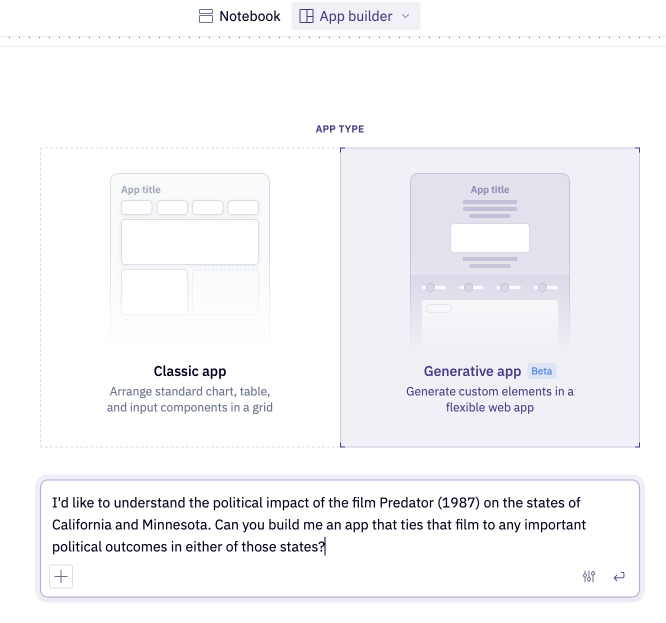
- Select the App builder tab in a project where you have Can Edit or higher permissions.
- Select Generative app when asked for an app type.
- Describe what you want to build in the prompt bar, then submit.
- The Hex agent will kick off and create your app, and you can continue to iterate with it in the sidebar.
From your workspace homepage
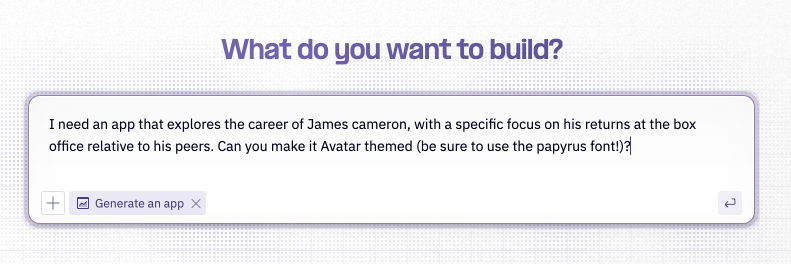
- Type a prompt into the prompt bar on your workspace homepage.
- Select the Generate an app intent.
- Submit your prompt. The Hex agent will open a new project in the App view with agent chat so that you can follow its work and keep iterating.
Iterate on your app
Each time the agent writes or edits a file, the updated app is pushed to the App tab live and you'll see the result render as the agent works. You can keep iterating in the sidebar with targeted prompts like:
- "Add a filter for region above the bar chart"
- "Switch the donut to a stacked bar"
- "Match the color palette to our brand: #0F62FE for primary"
The agent can also read the rendered app and its console output, so it can fix layout issues, broken components, and runtime errors when you ask.
Choose a model and effort
For open-ended builds — like generating a full app from scratch or making sweeping structural changes — consider selecting a higher effort level from the Model & Effort Picker in the prompt bar. Higher effort gives the agent more reasoning depth for complex, multi-step generation. For targeted tweaks, Auto is fine.
Edit code directly
You can edit the code that underlies a generative app yourself instead of going through the agent. From the App builder select Code to open the file tree for your app - App.js, its components, and styles - and edit the code directly. Make your edit, then select Preview to see it rendered in your app.
Editing directly is the faster path for small, precise changes, such as fixing a typo or removing a section. For larger changes, prompting the agent is usually still easier.
Chart controls
Every code-generated chart built within a Generative app includes a style panel with controls that let you make quick, manual adjustments without needing to prompt the agent. In a Generative app, you can select the entire chart or a specific sub-element to see the controls relevant to that element. Changes are previewed instantly and persist across future agent updates, so you can combine manual refinement with agent-driven development.
Get started
- Open the Generative app's editable draft.
- In the preview toolbar, select Select. If prompted, complete the one-time upgrade first.
- Select a chart, or an element such as its axis, series, title, or legend.
- Adjust the available settings in the Style panel.
- Apply the changes.
Control app style with a design.md
A design.md is a single file that captures your brand's visual language — colors, typography, spacing, component defaults, and tone — as a set of design tokens plus plain-language rules for how to use them. When the Hex agent builds a Generative app, it reads this file first and styles the app with your brand instead of its built-in defaults. Set it up once and you stop re-explaining your brand in every prompt; the agent applies it to every app it builds.
Generative apps are built on a token-based design system: every color, font size, spacing value, and radius is a token, and the agent styles components by referencing those tokens rather than hardcoding values. A design.md is how you set those tokens at the workspace level. It's an overlay — you only define the tokens your brand specifies, and anything you leave out falls back to Hex's defaults, so a short file with a dozen tokens works fine.
You can still steer a single build with a prompt ("ignore the brand palette here, use a dark theme"). The design.md sets the workspace default; your prompt takes precedence for that app.
Create your design.md with an agent
You don't have to write a design.md by hand. Hand the two files below to an agent, along with whatever describes your brand, and have it build the file for you. The Hex Threads agent works well here: it can search the web to pull in your hosted brand pages. Any coding agent works too.
The zip contains two files:
creating-a-design-md.md— the instructions the agent follows to build your file.design.example.md— a complete, working example the agent uses as the token vocabulary.
Then point the agent at your brand. Anything you have helps: brand guidelines (a hosted styleguide page or a document), a design system (a hosted token reference, a CSS/SCSS file, a Figma export, a Tailwind config, or a repo link), or other artifacts like a logo and color palette. A prompt looks like:
We're NexaCorp. Following
creating-a-design-md.md, build us adesign.mdfrom our design system:[link to your brand / tokens / CSS / repo]. Return the finished file as a single copyable Markdown code block, including its frontmatter, so I can paste it straight into a workspace guide.
Review the result, tweak any values, and add it to your workspace as described below. If you don't have a formal design system, you can still hand the agent a few brand colors and fonts, or start from the example and edit it directly.
Add it to your workspace
A design.md lives in your workspace guide library, the same place you manage other context for Hex agents. Add the file there — keeping its name and description frontmatter — and the agent reads it whenever it builds or edits a Generative app. Your design system is defined once at the workspace level and applies to everyone building Generative apps, rather than per-project.
Best practices
A few things specific to building in Hex:
- Override only what your brand requires. The agent ships with a deliberately restrained, data-first design system and strong defaults. Set the tokens you care about — your palette, fonts, density — and let the defaults handle the rest.
- Specify brand fonts that are available on Google Fonts. Generative apps load fonts through Google Fonts (see Security FAQ); a typeface that isn't available there won't load, and the app falls back to its default type stack.
- Don't make externally-hosted brand assets load-bearing. Generative apps run in a sandboxed iframe that restricts outbound requests, and a workspace setting can further block external HTTPS assets (like a logo served from your own CDN). Treat them as hints and assume the app must still look right without them.
- Keep it focused. The agent reads this file on every build, so keep it to decisions that actually shape the UI rather than an exhaustive style encyclopedia.
- Iterate by generating, not hand-editing. Build an app, see what looks off, and tighten the tokens or rules in
design.mdrather than restyling individual apps.
Publish and share your Generative app
Just like with our Classic apps, the best way to share your Generative app with others is to publish it. Publishing makes the latest version visible in the Published App view, while allowing you to continue to iterate in the Notebook view. Publishing on its own does not grant access to other users in your workspace — you still need to explicitly share the project with them before they can see it.
Scheduled runs and notifications
You can set up scheduled runs to run your Generative app on a defined schedule. Scheduled runs can only be configured on an already published app. Use schedules to update published results or send app notifications - however, Generative apps do not currently support app notifications with an attached screenshot. Configure schedules from the Scheduled runs tab in the Notebook sidebar, or from Scheduled runs & Notifications menu in the published app.
CSV downloads
Generative apps created before July 7, 2026 do not have this feature enabled and need to be manually upgraded. See Upgrading existing apps below.
In a Generative app, you can download the underlying data from any chart or table as a CSV file (up to 100MB per download). Hover over the chart or table, select ... at the bottom right, then select Download CSV.
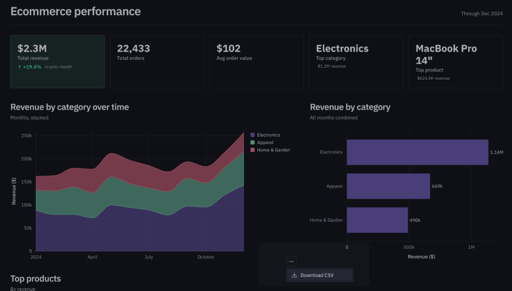
The CSV reflects the data exactly as it's displayed, so you download the data as you see it in your app. To enable this, Download and copy CSVs from tables must be turned on in your workspace settings for the download option to appear in your Generative app.
Upgrading existing apps
Apps that were published or created before July 7, 2026 don't have this feature enabled and need a one-time upgrade. To upgrade:
- Open the app builder and prompt the Hex agent: "Upgrade the charts and tables in this generative app to include 'Download CSV' functionality."
- Once the agent confirms the upgrade was successful, publish the project. Your charts and tables will now include the Download CSV option.
Switch between Classic and Generative apps
You can switch a project between Classic and Generative app types from the App type menu in the App builder. Switching between app types won't affect your work in either view or the underlying cells in the Notebook. Only one version of your project can be published at a time - you cannot have a single project with both a published Classic and Generative app.

A project can only have one published app at a time. If you switch app types and republish, the new app replaces the previously published version - you can't have both a Classic and a Generative published app built from the same underlying Notebook.
Security FAQ
How is the agent's generated code isolated?
Every Generative app runs inside a nested iframe with a strict content security policy that blocks all javascript outbound network requests, with an exception for Google Fonts. Whatever the agent writes cannot call third-party services or exfiltrate data. The browser blocks the request before it leaves the page.
How does the app access my data?
The iframe has no independent way to fetch data. It receives data exclusively from the backing project's Notebook through a single controlled channel, which means Generative apps automatically inherit your existing Hex permissions. Data connection access (including OAuth), workspace roles, and project sharing settings all apply to Generative apps the same way they do to Classic apps.
Limitations
While Generative apps are in Beta, some Hex features are not yet supported. These include:
- App notifications with screenshots
- Saved views
- Export as PDF
- Google Sheets export
- Published app comments
Chat with App is supported on Generative apps, and being specific helps the agent do its best work. See Chat with a Generative app.