Model picker best practices
Choose the right model and effort level for your analytical work in Hex.
You may have opened the model picker and wondered which name to pick — or been sent here to figure that out for yourself or your team. You don't need to memorize every option. When you want more control, match the model to the kind of question you're asking and how much you want to spend on credits.
Because the agent won't give the same answer every time, treat the guidance below as a starting point — not a guarantee. Match the model to what you're asking, try it, and adjust if the answer feels off.
This information was published in August 2026 and reflects models available through that date. Recommendations are informed by findings from DataBench, our benchmark for realistic analytical work with agents.
How to pick your model
When starting a new agent conversation, select the Auto dropdown to choose a different model for your session.
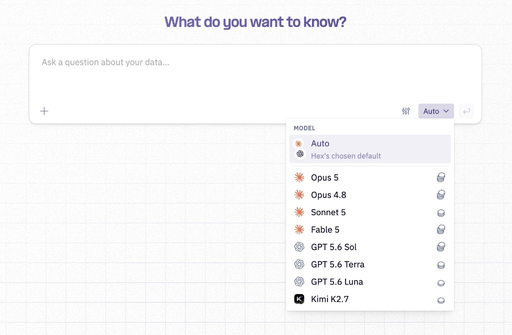
Auto
Auto is Hex's default model setting. Hex does not do model routing — Auto defaults to a single model Hex chooses to optimize for speed, cost, and quality. Auto is typically the right choice for most day-to-day analytics questions. If you need a smarter or cheaper model for a task, select it from the model picker.
Admins can also set a default model for the whole workspace from Settings > AI & Agents.
Choosing the right model for your task
Match the model to the shape of the ask — clear vs. ambiguous, lookup vs. judgment call — and to whether you're optimizing for depth or credits. Credit estimates below assume Medium effort.
| Model | Credits | Best suited for | When to reach for it |
|---|---|---|---|
| Fable 5 | $$$$ | Ambiguous, open-ended analysis | Exploratory work where the question isn't fully defined, or investigations that need careful, nuanced reasoning. A strong pick when getting it right matters more than cost — and when you may want to raise effort as you go. |
| Opus 5 | $$$$ | Hard analytical judgment | Deep investigations, multi-step reasoning, and high-stakes questions where you want maximum capability. Prefer Medium or High effort for most asks; the highest effort levels can add unnecessary complexity to an answer that was already on track. |
| Opus 4.8 | $$$ | Complex, multi-step analysis | Building involved queries, debugging tricky logic, or structured deep-dives with several moving pieces. Strong when the work is complex but doesn't need Opus 5 or Fable. |
| GPT 5.6 Sol | $$$ | Complex analysis at a lower credit cost | Multi-step analytical work where you want strong results without full frontier-model spend. Worth trying alongside Opus to see which fits your workflow. |
| Sonnet 5 | $$ | Everyday questions and quick iterations | Writing SQL, summarizing results, light data wrangling, and routine asks. For everyday work where credits matter more, also consider Terra or Luna. |
| GPT 5.6 Terra | $$ | Balanced everyday analysis | A practical all-rounder when you want solid day-to-day results without spending at the top of the range. |
| GPT 5.6 Luna | $ | Clear asks when you want to conserve credits | Well-defined questions where you still want solid quality at a much lower cost. Raise effort if you need a bit more depth — Luna stays relatively affordable as you do. |
| Kimi 2.7 | $ | Simple, well-defined questions | Quick syntax help, basic transformations, or straightforward lookups. Another strong option when you're optimizing for spend and the ask is unambiguous. |
A note on Fable 5: Because Fable 5 is part of Anthropic's Mythos class, Anthropic requires a 30-day retention window on all prompts and outputs for safety review. You must enable data retention in Hex to use Fable 5.
How to think about effort within a model
Medium effort is a sensible default for most tasks. Lower effort is faster and cheaper; higher effort can help on harder problems — but more thinking is not always better.
Practical takeaways:
- Start at Medium and adjust based on the result.
- On Opus 5, prefer Medium or High over Max for most analytical asks.
- On Fable 5, raising effort is a safer bet when the problem is still fuzzy.
- On Luna, raising effort is often an affordable way to get closer to Sol-quality results.
Analytical questions that look simple sometimes aren't — a tidy-looking dataset can hide messy logic underneath. If an answer feels shallow or off, try increasing the effort, switching models, or following up with a sharper question. Keep your judgment in the loop.
You can adjust effort in the model picker. For more detail from the providers, see Anthropic effort levels and OpenAI reasoning effort. Kimi 2.7 currently only allows Medium effort.
Conserving credits
If your goal is to stretch credits without giving up useful answers, reach for GPT 5.6 Luna or Kimi 2.7 — the two low-cost models in the picker.
GPT 5.6 Luna is built for clear, well-scoped questions where you still want solid analytical quality at a low cost. Raise effort when you need a bit more depth without a big jump in spend.
Kimi 2.7 is an open-source model we host on US-based infrastructure, known for lower costs. In our benchmarking, Kimi was at times about one-third the cost of frontier models in certain environments. It works best when the ask is clear and well defined.
When using Kimi, you'll see substantially more thinking messages; that's expected. The model spends time validating what it's attempting to do. You may also see slightly longer thinking times, but not always.
A good mental model: if a senior analyst would hand the task to a junior with clear instructions, Luna or Kimi can often do it cheaper. If they'd want to think it through with a peer, reach for Sol, Opus, or Fable.
Match the model to the ask
If you're still unsure which model to reach for, think about the shape of the question — not the size of the dataset.
| Model | The kind of ask |
|---|---|
| Fable 5 | "Build me a 12-month forecast from this messy data, then help me write an annual plan with targets GTM leaders should actually care about." Open-ended, high-stakes, and still half-formed. |
| Opus 5 | "Why is revenue diverging from pipeline across three regions, and what should we do about it?" Hard judgment calls where capability matters most. |
| Opus 4.8 / GPT 5.6 Sol | "Why are customers dropping out of the conversion funnel, and where should I be paying attention?" Multi-step diagnosis with real judgment calls. Try Sol when you want similar depth at lower cost. |
| Sonnet 5 / GPT 5.6 Terra | "Tell me more about this metric." Everyday analysis and the questions you ask many times a week. |
| GPT 5.6 Luna / Kimi 2.7 | "How many checkouts did we have last week? What did they purchase?" Clear ask, clear answer — and a chance to conserve credits. |
Start in Auto. Move up when the question gets fuzzy or the stakes get high. Move down when you already know exactly what you need — or when you're deliberately optimizing for spend.