AI data privacy
Data privacy is our top priority.
Hex offers first-class support for data privacy through initiatives like Workspace AI features opt-out, Bring Your Own Key (BYOK), and geographic data residency.
Workspace AI features opt-out
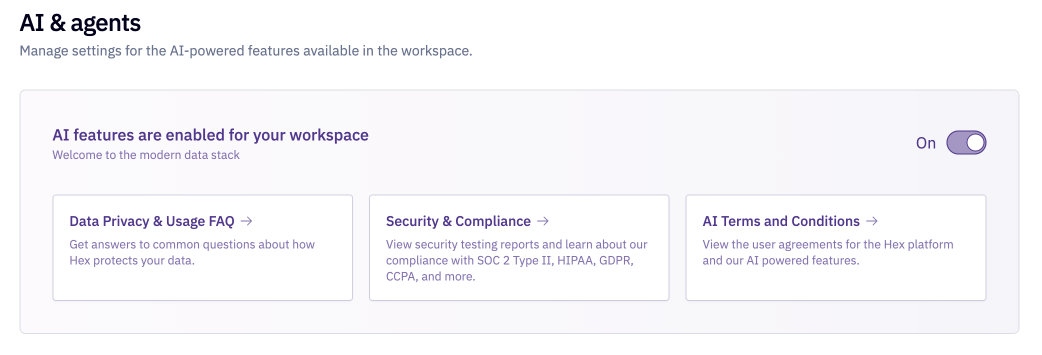
Hex admins can opt-out their entire workspace from AI features from the Settings > AI & agents settings page. Opting out of AI features at the AI & agents settings-level will disable AI features for all users.
AI training opt-out
Depending on your plan, Hex may use data from your AI sessions to improve Hex's AI features. You can opt out of this at any time in Settings > AI & agents without disabling AI features. See your applicable Terms of Service for details.
Third-party partner interactions
- Hex's LLM providers do not train on customer data. By default, Hex's LLM providers operate under a zero data retention policy. Certain advanced models require the model provider to retain prompts and outputs for a limited period for safety and security monitoring purposes. These models are only available when enabled by a workspace Admin. Retained data is not used for training and is automatically deleted at the end of the applicable retention period. Retention periods are dictated by the model provider and may vary by model. Hex's use of AI session data to improve its AI features is governed by your applicable Terms of Service. Hex does not disclose customer data to other customers.
- Hex uses Customer Database Metadata like schemas and Customer Data project code and output content as model context. This means that any sensitive information in your projects, table or column names, or in your code, could be passed to a model for inference.
- Hex's AI features are built on Hex’s secure data platform. These features are protected by secure practices and policies, are included in our third-party audits and bug bounty program, and safeguarded by the principle of least-privilege. You can learn more on our Data Privacy and Usage FAQ, Trust Center, and read our Terms and Conditions.
Model data retention settings
Workspace Admins can turn on Allow Data Retention For Specific Models in Settings > AI & agents to use models that require provider data retention, such as Claude Fable 5. When this setting is off, all model usage in Hex uses zero data retention.

Bring Your Own Key (BYOK)
- Available on the Enterprise plan.
- Users need the Admin workspace role to configure BYOK.
By default, Hex routes inference for its AI features through Hex's own model provider accounts. With BYOK, Admins can supply their own credentials so that inference runs through your organization's provider account instead.
BYOK is primarily intended to support internal security or procurement requirements by routing inference through your own provider account, agreements, controls, and logging. Please note that Hex does not take responsibility for any cost incurred by API calls, and BYOK is not necessarily a cost-saving measure. We encourage you to set up billing alerts to monitor usage and costs via your inference provider.
Supported providers
BYOK is currently supported for:
-
Direct providers who serve their own models through their own API.
-
Cloud providers who serve a direct provider's models from within their cloud.
| Provider Type | Provider | Models Available | Fast Mode Available?* | Credentials |
|---|---|---|---|---|
| Direct | Anthropic | Claude models | Yes | Anthropic API key |
| Direct | OpenAI | GPT models | Yes | OpenAI API key and organization ID |
| Cloud | AWS Bedrock | Anthropic Claude models, served from your AWS account | No | AWS Bedrock API key |
| Cloud | Google Gemini Enterprise Agent Platform (GEAP)** | Anthropic Claude models, served from your Google Cloud project | No | Google Cloud service account |
* Fast mode is available when using specific models selected from the model picker (not Auto mode), and if the model has a fast path available from the provider.
**GEAP was formerly known as Google Vertex
Scope
BYOK applies to inference performed by third-party model providers. Some functionality, such as typeahead, is powered by models Hex runs on its own infrastructure and is unaffected by your BYOK configuration.
BYOK applies to your entire workspace. Once enabled, all eligible inference routes through your key — you can't selectively route features/users through Hex's models and others through your own key. This also means models Hex hosts directly (such as Kimi) aren't available while BYOK is enabled.
Configuration
To set up BYOK, head to Settings > AI & agents > Provider settings and select the Add an API key button at the right side of the Model provider setting. Enter your credentials as prompted in the setup flow and select Save. Hex validates them with a live request to your provider before storing them.
-
Default providers: allow you to utilize both OpenAI and Anthropic models based on Hex defaults - both OpenAI and Anthropic keys must be provided.
-
Specific providers: allow you to select a singular (direct or cloud) provider to route inference to.
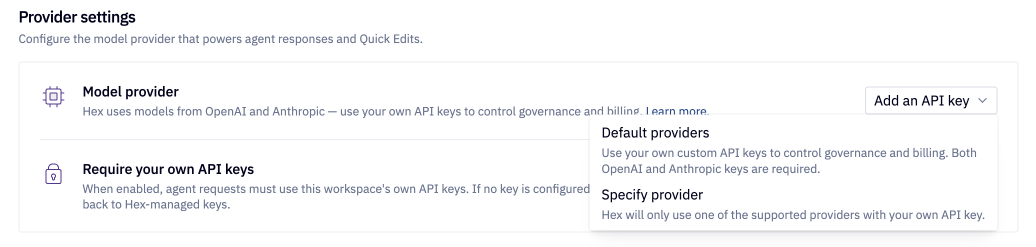
The Require your own API keys setting can be toggled on to require AI usage in Hex to route through your provided key. If no key is configured, requests fail rather than falling back to Hex-managed keys.
To rotate a key, use the refresh button to the right of the Model provider setting and add the new key.
Cloud providers
- Currently, only Anthropic models are supported via cloud providers.
- Anthropic's
Fast modeis not available via cloud providers.
When setting up a cloud provider, you must enable specific models via your cloud provider to allow for model usage in Hex.
- A list of current models used in Hex and directions to enable these models in your given cloud provider are outlined in the Hex BYOK setup flow.
If Hex sends requests to a model you haven't enabled, fallback requests to other models will be attempted. However, these fallback attempts will also fail if these fallback models are not enabled for your workspace or exposed via your key.
- If you're experiencing persistent agent failures with a cloud provider configured, check the current list models used in Hex via the refresh button to the right of the Model provider setting, and ensure all models are enabled in your cloud provider.
- Reach out to support@hex.tech if you're still seeing issues after confirming this.
Third-party gateways
Model traffic can be routed through an AI gateway, which acts as a proxy between applications and model providers. Gateways must be exactly wire-compatible with the provider they front and behave as a transparent proxy — gateways that transform requests or use a different API shape aren't supported in Hex.
When setting up your BYOK provider, enter your gateway's address in the Base URL field to route inference through your gateway.
Please reach out to support@hex.tech if:
- your gateway renames models or requires custom headers — additional configuration may be needed
- you're interested in using another provider or setup not listed here.
Troubleshooting gateway setup
Most gateway setup issues come down to the format of the base URL. Before connecting a gateway to Hex, confirm you can reach it successfully using OpenAI or Anthropic's official SDK for your provider:
- Create a Hex project and store provider credentials as a project secret
- Run the SDK code snippet for your applicable provider
Anthropic SDK
Store your Anthropic API key as a project secret named ANTHROPIC_API_KEY and adjust the base_url to your desired gateway value. Run the Anthropic SDK code snippet below:
!uv pip install anthropic

from anthropic import Anthropic

anthropic_client = Anthropic(
    api_key=ANTHROPIC_API_KEY, # store as project secret
    base_url="https://your-custom-endpoint.example.com", # adjust to your desired gateway value
)

anthropic_message = anthropic_client.messages.create(
    model="claude-opus-4-8",
    max_tokens=1024,
    messages=[{"role": "user", "content": "Hello!"}],
)

print(anthropic_message.content[0].text)
Anthropic SDK - AWS Bedrock
Store your AWS bearer token as a project secret named AWS_BEARER_TOKEN_BEDROCK and adjust the base_url to your desired gateway value. Run the Anthropic SDK for AWS Bedrock code snippet below:
!uv pip install anthropic

from anthropic import AnthropicBedrock

client = AnthropicBedrock(
    api_key=AWS_BEARER_TOKEN_BEDROCK, # store as project secret
    aws_region="us-west-2",
    base_url="https://your-custom-endpoint.example.com", # adjust to your desired gateway value
)

message = client.messages.create(
    model="us.anthropic.claude-opus-4-8",
    max_tokens=1024,
    messages=[{"role": "user", "content": "Hello!"}],
)

print(message.content[0].text)
Anthropic SDK - GEAP
Store your GEAP Service Account JSON as a project secret named VERTEX_SERVICE_ACCOUNT_JSON and adjust the base_url to your desired gateway value.. Run the Anthropic SDK for GEAP code snippet below:
!uv pip install -q "anthropic[vertex]"

import json
from anthropic import AnthropicVertex
from google.oauth2 import service_account

vertex_service_account_info = (
    json.loads(VERTEX_SERVICE_ACCOUNT_JSON) # store as project secret
    if isinstance(VERTEX_SERVICE_ACCOUNT_JSON, str)
    else VERTEX_SERVICE_ACCOUNT_JSON
)
vertex_credentials = service_account.Credentials.from_service_account_info(
    vertex_service_account_info,
    scopes=["https://www.googleapis.com/auth/cloud-platform"],
)

vertex_client = AnthropicVertex(
    project_id=vertex_service_account_info["project_id"],
    region="global",
    credentials=vertex_credentials,
    base_url="https://aiplatform.googleapis.com/v1", # adjust to your desired gateway value
)

vertex_message = vertex_client.messages.create(
    model="claude-opus-4-8",
    max_tokens=1024,
    messages=[{"role": "user", "content": "Hello!"}],
)

print(vertex_message.content[0].text)
OpenAI SDK
Store your OpenAI API key as a project secret named OPENAI_API_KEY and adjust the base_url to your desired gateway value. Run the OpenAI SDK code snippet below:
!uv pip install openai

from openai import OpenAI

client = OpenAI(
    api_key=OPENAI_API_KEY, # store as project secret
    base_url="https://us.api.openai.com/v1", # adjust to your desired gateway value
)

response = client.responses.create(
    model="gpt-5.6-sol",
    input="Reply with exactly: OpenAI Responses API test successful.",
)

response.output_text
Errors running the SDK request against your provider indicate an issue with your setup:
- incorrect base URL — you may need to add or remove parameters from the URL path
- networking issues, such as IP whitelisting
- the requested model hasn't been made available in your provider
- invalid credentials
- your gateway isn't wire compatible
If the SDK request succeeds but your gateway still doesn't work in Hex, please share your project with Hex support (via the ? menu in the bottom left > toggle on Share with support) and reach out to support@hex.tech for assistance.
Model availability
BYOK limits the models available for use in Hex to those that are exposed via your key(s).
- Hex routes to both Anthropic and OpenAI models by default. Configuring BYOK for a single provider limits usage to that provider's models.
- Models that Hex hosts directly (such as Kimi) aren't available while BYOK is enabled.
- Cloud providers require models to be manually enabled. Failure to do so will prevent these models from being used in Hex.
- Auto mode functionality, where Hex defaults to a single model to optimize for speed, cost, and quality, may be decreased if the given model isn't enabled or exposed by your key.
Usage visibility
Because AI usage will not consume Hex credits with BYOK enabled, AI usage visibility will need to be accessed through your external model provider.
Hex includes an x-hex-user-email HTTP header on all inference requests to identify which user triggered the request. In cases where the request is better attributed to system processes, such as Thread summarization or context workflows, this header will be omitted.
BYOK and credits
AI usage through your own key does not consume Hex credits. Users still receive their monthly per-seat credit grants, but those grants aren't drawn down by agent usage.
Please reach out to support@hex.tech if you're interested in using another provider or setup not listed here.