Reference repositories
Connect to git repositories to provide the Hex Agent with richer context
- Available on the Team and Enterprise plans.
- Admins, Managers, Editors, and Explorers can use reference repos in threads with the Hex Agent
- Only Admins and Managers can configure reference repositories.
Reference repositories are a way to connect your git repositories and provide the Hex Agent additional context on your data. The agent can pull information from across multiple repositories to answer questions about how your data is defined and how it maps to different features across your application.
How to configure reference repositories
Only Admins and Managers can configure reference repositories. Access must also be approved by a repository admin on the Git provider side.
To add a reference repository:
- Navigate to Context Studio
- Open the Repositories tab
- Select + Git provider to set up a connection
- Once connected to a Git provider, you can add a repository by clicking + Repository
- Choose a repository and branch to sync
- Add a description
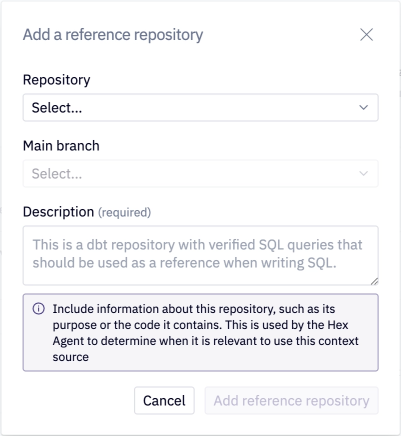
Providing a detailed description helps the agent determine when a repository is relevant and how to use it effectively.
Note that only one Git provider account can be connected to a given Hex workspace. Once connected, all users with access to the agent can use information from synced repositories.
GitHub, GitLab cloud, and GitLab self hosted are supported at this time.
Using reference repositories
Reference repositories can be used in both Threads and the Notebook Agent.
When you submit a prompt, the agent uses repository descriptions to determine which repositories are relevant. It can then download the repositories within the thread and identify relevant files or sections - this includes clarifying metric calculations, table structures, or which features have event logging.
To encourage the agent to use a reference repository, you can mention it in your workspace context or guide files and map it to specific metrics or domains. You can also include the name of a repository directly in your prompt when needed.