Knowledge Engine
A self-learning, graph-based context system for Hex 4.0.
- The Knowledge Engine is in beta and is available to select workspaces as part of the Hex 4.0 public beta.
- Workspace Admins and Managers can browse workspace knowledge in the Context Studio.
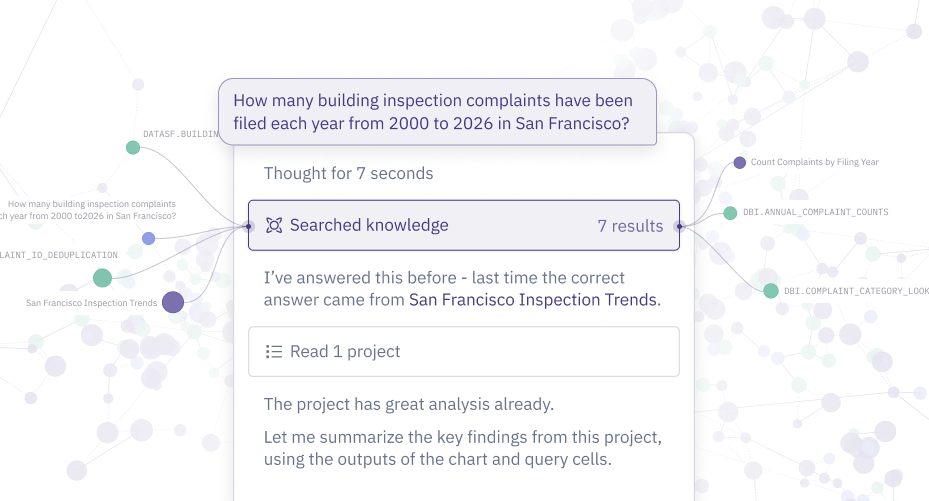
The Knowledge Engine is a self-learning system – picking up knowledge from all your context and agent conversations to form an agent-facing graph. This graph then serves as the primary search interface for all context retrieval and analytics work in Hex.
The engine makes use of previous agent discoveries to improve efficiency while keeping data teams in control. You can see what the agent has learned, understand how it uses that knowledge, and steer it when needed.
Configure knowledge curation and search
The Knowledge Engine is enabled by default for workspaces included in the 4.0 public beta. Admins can update settings in Settings > AI & agents > Knowledge.
| Setting | What it controls |
|---|---|
| Build the Knowledge Graph | Allows Hex to automatically collect and link context from verified sources, published projects and eligible conversations to make the agent more efficient and accurate. |
| Use the Knowledge Graph | Allows 4.0 agents to search knowledge for relevant context when answering questions and building apps. This applies to 4.0 agents only. |
Turning off either setting does not delete the graph or change existing thread responses that used the graph's knowledge.
How knowledge is created
Every night, a background Curator Agent reviews your workspace and adds any new learnings into your graph. It builds from two sources:
-
What you’ve defined
It translates new or changed guides, semantic models, and published projects directly into individual units of knowledge.
-
What agents figured out
It documents the judgment calls agents made and the context discovery paths they followed while answering questions in your workspace that day.
The Curation Agent can draw from several different resources:
| Source | What can be included | Exclusions |
|---|---|---|
| Guides | Current, published content. | — |
| Semantic models and views | Definitions on eligible data connections. | — |
| Projects | Endorsed projects shared with the workspace, with eligible data connections. | Archived, unlisted, and deleted projects are excluded. |
| Shared threads | Threads shared with the workspace, with eligible data connections - this includes connections used by accessed projects. | Private threads, tasks, tests, and evals are excluded. |
The Knowledge Engine only builds from sources that are accessible to everyone in your workspace. As we expand the beta, we'll evolve our authentication controls so as to safely expand its learning opportunities. An eligible data connection is included for AI usage, shared with the workspace through Can view results or Can query access, and not marked as Sensitive. Resources using OAuth connections aren't automatically excluded, but threads with user-scoped results aren't eligible for learning.
It then reconciles what it learns. Duplicate learnings merge, so ten threads that each defined “active customer” all back one unit of knowledge. When you change some documentation in your workspace, like a guide or a semantic model, any associated knowledge is updated. Conflicts, whether in agent behavior or across your context layer, get consolidated into a single unit of “contested knowledge,” so agents proactively know about alignment gaps rather than silently choosing whichever guidance they happen to encounter first.
This reconciliation process means each unit of knowledge receives a status that reflects where it came from and how the agent should rely on it:
| Status | What it means | How the agent treats it |
|---|---|---|
| Verified | Backed by authored context: a guide, a semantic model, or an endorsed project | Relies on it |
| Supported | A well-supported decision corroborated by available context | Uses it as a strong hint |
| Learning | A decision the agent had to make that is neither supported nor denied by available context | Uses it as a lead to check, not a fact |
| Contested | Sources disagree, e.g. a guide vs. a semantic model, or agents across different threads | Investigates, and asks or discloses which interpretation to use |
| Debunked | Shown to be wrong | Kept as a cautionary graph record and left out of search |
How knowledge is used
The Knowledge Engine is Hex 4.0’s new interface to workspace context. Instead of searching through all of your raw context (like guides, semantic models, repos, and endorsed projects) the agent now searches the graph to find and reuse existing knowledge, returning to the raw context or warehouse only when it needs to discover or validate something no agent in your workspace has done before. This means not only fewer tool calls, but also fewer opportunities for agents to make conflicting analytical choices.
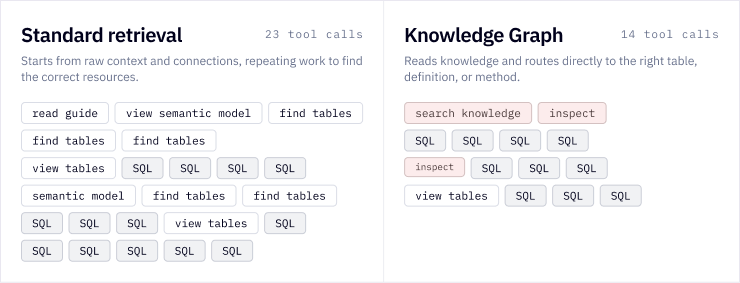
You’ll see references to this show up in your agent thinking when you run a Hex thread. Note that if a user asks a question related to contested knowledge, the Hex agent will ask them to confirm which method to use.
Review workspace knowledge
Only Admins and Managers can review, edit, and delete workspace knowledge.
Admins and Managers can open Context Studio > Knowledge to review workspace knowledge. You can search for specific content or filter by resource or status. You can also switch to the Graph view to visualize connections between knowledge and related resources.
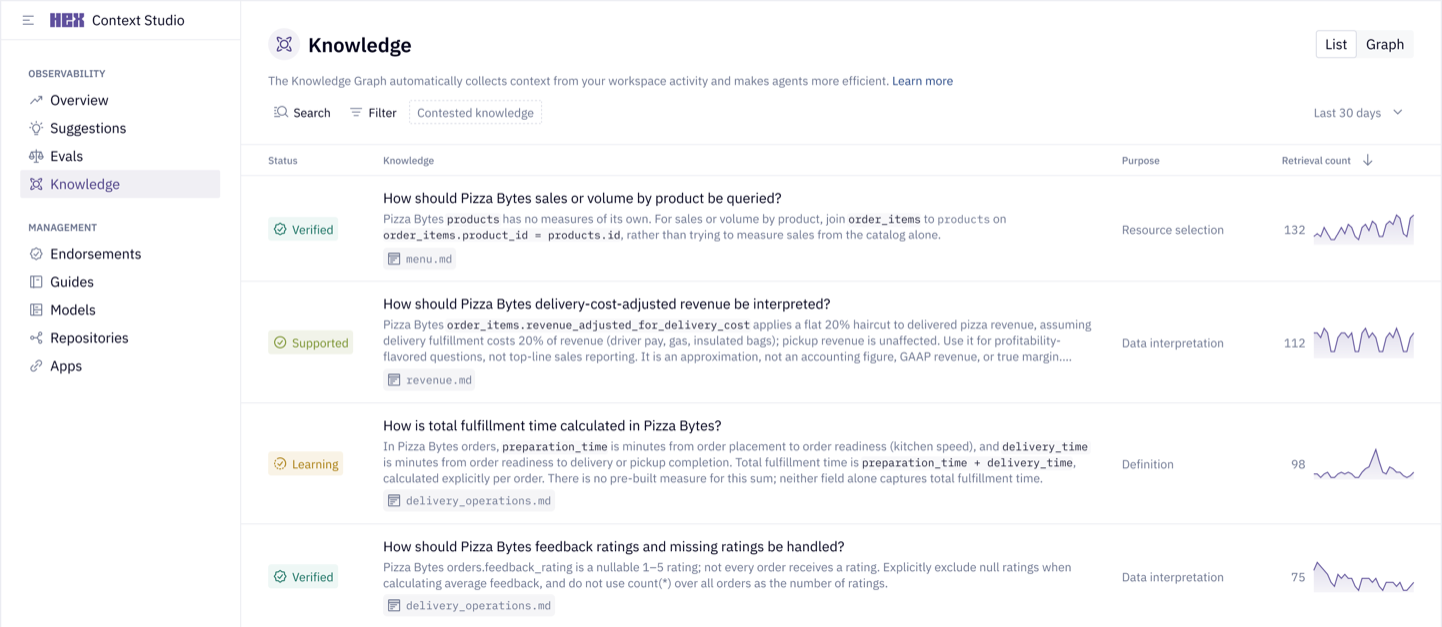
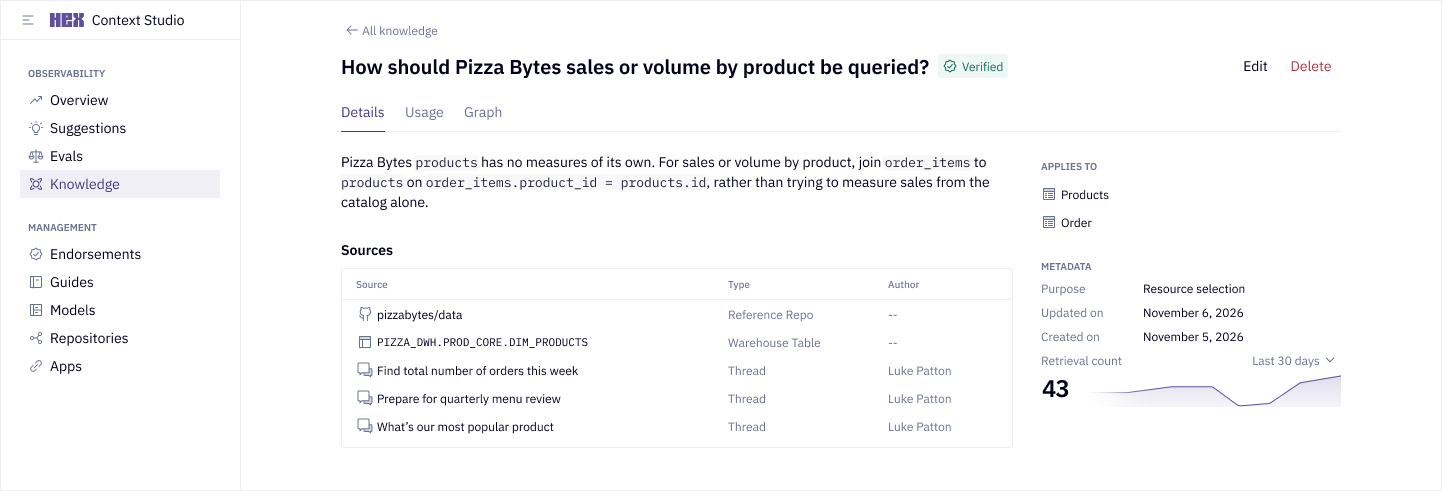
Select a unit of knowledge to view its statement, resources, and other metadata. Open the Usage tab to see threads where the knowledge has been surfaced. The retrieval count shows recorded thread usage over the selected period.
Edit or delete knowledge
"Supported" and "Learned" knowledge can capture decisions the agent made without structured context to guide it. We recommend reviewing it for accuracy and editing it as needed. If the knowledge is both accurate and important, publish it to your workspace context to make it verified knowledge.
To edit or delete a knowledge unit, open it and select Edit or Delete in the top right. When editing a unit, you can change its title or statement. Edits apply to the unit immediately.
Verified knowledge comes directly from your workspace context and can't be edited or deleted in Knowledge. If it's incorrect or out of date, update the underlying context resources. The change will then be consolidated during later curation runs.
Permissions
The Knowledge Engine only builds from sources that are accessible to everyone in your workspace. As we expand the beta, we'll evolve our authentication controls so as to safely expand its learning opportunities.
If your organization has Governed mode enabled, the Hex agent will honor the Governed mode policy when retrieving knowledge.
Resource changes
If you unshare a resource, the graph stops learning directly from it. Knowledge already learned from the resource remains, and eligible threads can still contribute information about it.
At the start of a curation run, Hex removes knowledge units linked to deleted guides, semantic models, views, or projects. It also removes affected knowledge when a data connection is no longer eligible. Separate knowledge units based on other resources may still contain similar information.
FAQ
How should I expect to interact with my workspace's knowledge?
You actually don't need to do anything!
If you’re using Hex 4.0, the Hex Knowledge Engine will run every night and it will start powering your threads automatically. You’ll see knowledge powering agent thinking, and your threads will be faster.
As graph usage builds up, use the newfound visibility to guide your decisions on where to invest in context management.
If you want to take a peek, you can review contested knowledge, which might indicate inconsistencies in your context layer or places where agents aren’t agreeing.
What should I do if I see "supported" or "learned" knowledge that is incorrect?
The Knowledge Engine codifies decisions agents in your workspace are already making. In that way, the graph functions as an observability surface into how agents are leveraging your existing context, what they’re learning from it, and what they’re having to come up with in the absence of clear guidance. The Knowledge Engine does the review your data team would otherwise have to, and finds those hidden gaps and inconsistent or incorrect agent behaviors.
If you see knowledge that looks incorrect, we recommend adding context to your raw context sources (e.g., semantic models, guides, etc.) to give the agent better guidance in the future.
How can I tell if the agent referenced knowledge in a thread?
If the Hex agent retrieved knowledge, it will appear in the Hex agent’s thinking block in a thread. You can review each knowledge unit's statement, status, and connections.
Why don't I see "supported" or "learned" knowledge in my workspace?
Currently, the Knowledge Engine only learns from context available to everyone in your workspace. If your workspace is set to not share new threads and projects by default, that will limit the Knowledge Engine's learning opportunities.
Admins can navigate to Settings > Workspace security to configure whether new threads or projects are shared with the workspace by default.
Why are the knowledge retrieval stats set to 0?
Knowledge is only powering agent retrieval for Hex 4.0. As you start using Hex 4.0, you should start to see retrieval stats accumulate.
How can I see the impact of the Knowledge Engine on the Hex agent?
Admins can review retrieval counts and the Usage tab in Context Studio > Knowledge to see which units are being surfaced and where.
You can also run an eval suite with either the 3.0 agent or 4.0 agent to compare accuracy, performance, and AI credit usage. Within the UI, you can open a suite from Context Studio > Evals and select which agent you'd like to test from the Run now dropdown.
If you're running an eval suite via the CLI, you can use the following commands:
hex eval run --suite-id <id> --entrypoint agent_4_0hex eval run --suite-id <id> --entrypoint agent_3_0hex eval list --suite-id <id>
What is the difference between suggestions and knowledge?
Earlier this year, we launched Suggestions – a first step toward “self-learning” that makes gaps in context visible so humans can improve the system. The Knowledge Engine builds on this, taking a more automated approach to self-learning while still keeping your data team in control.
We have much more coming on this front soon!
Does curation use AI credits?
Background curation of knowledge does not consume workspace AI credits. Agent usage in threads follows the usual AI credit rules.
Does the Knowledge Engine train a model on my data?
No. It stores workspace knowledge for the agent to retrieve. AI models process context during curation and thread responses, but the Knowledge Engine does not train or fine-tune a model. See AI data privacy.
Can external agents take advantage of knowledge?
Yes! Knowledge becomes context and is retrievable like any other kind of context stored in Hex by our MCP tools.