Connect to Trino
Securely connect your Hex workspace to your Trino database.
- Users need the Admin workspace role to create a shared workspace data connection.
- Users need Can Edit or higher project permissions to create project data connections.
Trino (formerly PrestoSQL) is an open-source distributed SQL query engine designed to query data across multiple sources (data lakes, databases, warehouses, etc.) without moving or copying the data. Trino excels at federation, allowing you to join data from S3, PostgreSQL, MySQL, Kafka, and dozens of other sources in a single query. It's fast for ad-hoc analytics and doesn't store data itself; it's purely a query engine that you deploy and manage (on-premises or in the cloud).
Trino is ideal if you need to query data across disparate sources without ETL, or if you're building a data lakehouse architecture on object storage like S3. However, Hex users should note that query performance when using a Trino data connection depends heavily on the underlying data format and organization. Poorly optimized data can lead to slow queries.
How to get set up
- In Hex, go to Settings → Data sources.
- Click + Connection, select Trino, and fill out the required fields.
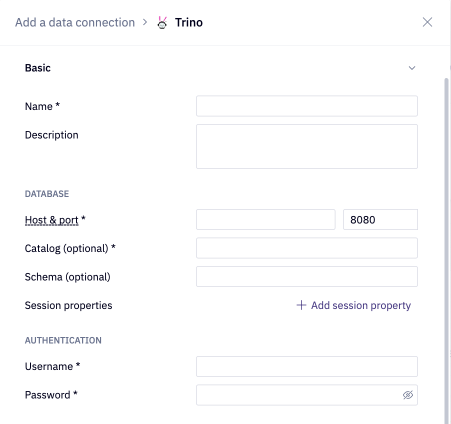
Basic settings
- Name and Description - Set a display name and optional description to help identify your data connection.
- Host and Port - The host URL and port for your Trino database. The default port is 8080.
- Catalog (optional) - Specifying a default catalog allows you to reference schema and table names in your queries without needing to type the catalog name.Allows you to query schemas and tables without needing to type the default catalog name in your SQL query.
- Schema (optional) - Allows you to query tables without needing to type the default schema name in your SQL query.
- Session properties - The session properties this connection should use.
- Username and Password - The username and password for the Trino account you're using to connect to your Trino database.
Additional settings
The data connection form includes several optional sections:
- Advanced - Optional settings like custom SQL formatting, including schema data for AI, and connecting via SSH.
- Access - Optional data connection permissions.
- Schema browsing - Recommended settings like scheduling schema browser refreshes and schema filtering, both of which are recommended for performance and AI agent accuracy.
If you use a firewall to restrict database access, you'll need to add Hex's IP addresses to your allowlist.