ClickHouse chDB integration
Hex lets ClickHouse users run Python workflows using chDB, ClickHouse's in-process database. A drop-in Pandas replacement, this makes it easy to work with large datasets without loading everything into the memory in your Hex project.
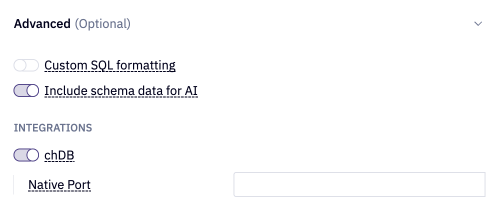
Enable chDB
chDB can be enabled on both workspace and project-level data connections (similar to other connection integrations).
To enable chDB on a ClickHouse data connection:
- Open the ClickHouse data connection settings.
- Scroll to the Advanced section.
- Toggle on chDB
Getting started with chDB in Hex
chDB operates using lazy evaluation, meaning commands execute only when action calls are performed. Data materializes and queries run only when needed, making this a very effective way to manage memory usage in Hex when working with large ClickHouse datasets.
To use chDB in a project, first import the data connection that has chDB enabled into your project. Once imported, you can create a chDB session with Hex's easy button:
Hex’s ClickHouse data connection already stores the network and auth details allowing Hex to read those settings and instantiate a ClickHouse DataStore. Hex's built-in hextoolkit package securely handles this allowing you quickly and securely create your chDB connection to ClickHouse. The following code is generated:
import hextoolkit
hex_clickhouse_conn = hextoolkit.get_data_connection('My ClickHouse Connection')
session = hex_clickhouse_conn.get_chdb_session()
- The get_chdb_session function is only available for Python 3.12+ kernels
Working with chDB in Hex
Once your connection is created, you can write SQL and perform Pythonic operations, all executed directly in ClickHouse:
ds = session.sql("SELECT * FROM transactions_table")
filtered = ds[ds["event_type"] == "purchase"]
To use the DataStore object as the input to a chart, pivot or other cell, you'll need to convert it to a Pandas dataframe using the .to_pandas() method
# Materialize only when needed
df = filtered.to_pandas()
For more detailed examples and inner workings of the package, please see our chDB Tutorial project.
- You can duplicate this project into your own Hex workspace to run the notebook